8705 comments found.

Hi i am stuck on how to deregister one domain and use license on another please help.
Hi pwspartner! Next to the error message you probably have, there is a ‘More Info’ link that takes you to a documentation page with all the information you need. If you haven’t seen it in a nutshell, please send a private message using the form you find on this page and include your Purchase Code: https://themeforest.net/user/undsgn
Hello. I show YouTube or Vimeo videos on the portfolio page with the Lightbox function. I link YouTube videos with the Add Multimedia function and use the Poster image as a thumbnail. It worked fine for several years. However, recently, when I add a new portfolio, the YouTube that appears as a light box does not work properly. The play button appears, but when I play, it says that the address is incorrect and does not play.
I tested it with many videos on YouTube, but they do not all appear.
I also confirmed that when I turn off the light box and move the page with the Link to post function, the YouTube video plays normally.
My conclusion is that there seems to be a problem when loading YouTube with the Lightbox function.
I updated WordPress and the uncode theme periodically and did not change any settings. WordPress is 6.7 and uncode is 2.9.04.
It is very bad because I cannot add a new portfolio. Please help.
Hi ffive5! At the moment we don’t have any similar reports from other users. Please try to share the link of a similar page so we can understand how it’s constructed and replicate it on our servers to see what happens.
Hi there,
I am using Uncode v2.9.1.3 (Wordpress v6.7) and I am struggling to see hyperlinks in the gutenberg editor. They are dark grey / black, and so is the text in the editor, so it is really difficult for me to identify what is a link and what is not.
It looks like the Uncode theme styles the gutenberg editor with CSS under the tag <style id=”uncode-gutenberg-css”> in the post.php page.
Here is the CSS that is causing the issue
.block-editor .edit-post-visual-editor a {
     color: #1b1d1f;
     text-decoration: none;
     transition: color 200ms cubic-bezier(0.785, 0.135, 0.15, 0.86);
 }
I have tried disabling all plugins, removed all custom CSS and tried to change the CSS above using Appearance > Customize and a child theme, but the issue persists.
How do I resolve this issue because at the moment the writing experience with the Uncode theme is very challenging !?
Hi JMWinfield! Please share the link to your website so we can check the problem, sorry but it’s not easy to identify the possible issue just in words.
Hi @Undsgn, I do not think a link to the website would not help, as the issue is not with the front-end, it is with the back-end (the gutenberg editor).
Please see the screenshots here: https://www.dropbox.com/scl/fi/mxvk5q9ghxn19gfoerrjx/Gutenberg-Editor-Link-Issue-1.pdf?rlkey=xh10wd3lvvifqgdg07b77wc15&st=sleuglgu&dl=0
Hopefully the screenshots explain it a bit better 
Thanks, J
Hi JMWinfield! Sorry… but this is not the same as you have on the frontend of the website? Did you try this option set to Accent? https://undsgn.d.pr/i/xC7KVw
Please see the file above. Page 1 and 2 show how the links appear in the WP post editor (in the back-end). Page 3 shows how the links appear in the front-end of the website (i.e. what a visitor would see when reading a blog post).
Regarding “Did you try this option set to Accent? https://undsgn.d.pr/i/xC7KVw" – This is setting is set to “Accent Color” which is a blue color.
Hi JMWinfield! Ok, please update this file “uncode/core/inc/compatibility/gutenberg/class-uncode-gutenberg.php” with this: https://pastebin.com/raw/qMHrFwEv
Hi Undsgn,
Thanks for this.
That didn’t work but I had a play with it, and this code worked in “uncode/core/inc/compatibility/gutenberg/class-uncode-gutenberg.php”
.block-editor .edit-post-visual-editor a {
    color: <?php echo sanitize_text_field( $accent_color ); ?>;
    text-decoration: none;
    transition: color 200ms cubic-bezier(0.785, 0.135, 0.15, 0.86);
}
.block-editor .edit-post-visual-editor a:hover {
color: <?php echo sanitize_text_field( $accent_color ); ?>;
}Is this something you are going to fix in the next version of Uncode?
color: <?php echo sanitize_text_field( ot_get_option('_uncode_body_link_color') === 'accent' ? $accent_color : $dark_text_color ); ?>;
This means that use the accent color if you select “Accent color” in “Link Color”. We tested it and it works. Not sure if you didn’t clear the cache of the dynamic files. We’ll insert this fix. If for some reason it doesn’t work for you open a ticket so we can see the details.
Hi Undsgn,
My mistake, the “Link Color” was set to “Default” not “Accent Color”. I confirm this works on my side Thank you very much!!
When will the next version of Uncode (that includes this fix) be available?
Hi JMWinfield and thank you for the confirmation! We do not have a definite date at the moment, it will be included.
Brill, thanks Undsgn!
You welcome!
Hey there! Thank you for the excellent theme! I have a question about setting a site wide border frame color/shadow. Like here: https://undsgn.com/uncode/homepages/blog-gazette/
I have set the the body frame colour but I am unable to find where to set the body frame border colour.
I have noticed, it seems like none of the vertical borders seem to be showing
Update: I have discovered the issue with the internal borders. However I am still trying to achieve the border effect with site wide frame
Hi marq209! We are sorry but we don’t have other similar reports, so we are not sure what issue you discovered, if you activate the Frame Border it just shows up (and the color option is just under the main option): https://undsgn.d.pr/i/Je5V0X
If you need help please share at least the link to your website.
In your code the colour is attributed via the frame border shadow? https://nathanieljoseph.com/blog-gazette/. It works when i have a white background. When I change to a black background, and a black frame how can I change the frame border (shadow) change to white?
Hi Hi marq209! We are not sure to understand… but on the page Custom CSS option you have a small cod that transforms the shadow to a border, if you remove this code you have the original shadow for the Frame element: https://undsgn.d.pr/v/kISl3M
If you want to modify the Frame Shadow it’s not supposed there is an option, you just need to remove the small code you have and use this in the Theme Options > CSS:
.body-borders .body-border-shadow {
    box-shadow: 0px 0px 30px rgba(0, 0, 0, 1);
}
Thank you, this was exactly what I needed!
Thank you very much! Solved the issue I was having.
Thank you for the confirmation!
Hi, how do I deactivate a purchase code? I have deleted my website and domain and want to install on a new domain. Any help would be great please. (Latest purchase)
Hi Andrewprod! Next to the error message you probably have, there is a ‘More Info’ link that takes you to a documentation page with all the information you need. If you haven’t seen it in a nutshell, please send a private message using the form you find on this page and include your Purchase Code: https://themeforest.net/user/undsgn
Thank you
You wewlcome!
Hello – I purchased Uncode while ago and installed it on a website that I never finished or used (aside from a coming soon page). I would like to use it for another project/url instead. I deregistered and deleted the theme and files on the unused domain. I want to register it with another domain where I can actually put it to use. Please advise. Thank you.
Hi Printly! Next to the error message you probably have, there is a ‘More Info’ link that takes you to a documentation page with all the information you need. If you haven’t seen it in a nutshell, please send a private message using the form you find on this page and include your Purchase Code: https://themeforest.net/user/undsgn
Hello! I’m trying to make a header that is placed after the menu, not under the menu on my page. I don’t want my menu to be transparent. When I did the content block with a header, I saw a menu as not transparent on the top of the page, and then the header section followed, but then when I linked My Header Content Block to the page, my Menu became transparent.
How can I change it? Please. I unchecked the Menu transparency in the Theme Options section. I want my header to be placed after Menu, not under the menu.
Hi svetpkv! We are sorry but it’s really not easy to understand a design thing like this just in words. Here we need to check the design and the actual website to suggest a possible solution. If you need support is offered in our Help Center, there we have a completely dedicated support team, please submit a ticket so we can check your installation and support the solution: https://support.undsgn.com/hc
Hi guys, my support expired but I’m still struggling withe video I got on the homepage despite the fact I tried to load it in several formats and sizes.. That video is the main thing of the website and I need it to work, can you arrange something or help me with that ?
Hi markoraguz! Please share the link to your site so we can check if it’s possible to suggest something different from the info you find on our doc. MP4 is generally fine, you should just check that there is not a problem with the codec.
I tried MP4, WebM, different codecs, reduced the size of the file several times from 36Mo to 5Mo.. Honestly I don’t get it, I really need this to be fixed 
Hi markoraguz! Not sure if you have found a solution during the weekend but from here the video works as it should: https://undsgn.d.pr/v/4lCaaD
Hi guys, it’s not on the laptop version but on the responsive version that it doesn’t work
And except that, the template is great, everything works perfectly !
Hi markoraguz! Ah not very easy to understand it was never mentioned that the problem was on device. In the Row settings of the Header please check the Responsive Visibility settings, it seems that this Row is Hidden on Mobile: https://support.undsgn.com/hc/en-us/articles/214003585-Row-Settings#&gid=1&pid=9
Hi there! Now the time has come to update my website. I have to admit, that i’v skipped a few versions by now … is there a (step by step?) guide around ? what’s especially important for you theme? I don’t wanna mess up my site. thank you!!!
Hi StephanRender! There is no particular procedure if you missed some versions: https://support.undsgn.com/hc/articles/214001205
What can always be useful, however, whenever you are working with database drivend solutions such as WordPress is perhaps having ab backup of your installation: https://support.undsgn.com/hc/articles/360001216518
thanks for the help and the immediate reply! all the best!
Thank you for the confirmation! 
Dear Uncode Team,
I am considering purchasing your Uncode theme and have some questions regarding its integration with Elementor:
Elementor Integration: Is the Uncode theme compatible with the Elementor Page Builder? To what extent can I customize Uncode’s templates using Elementor?
Compatibility with Envato Elements Templates: Are there any known compatibility issues when using Elementor templates from Envato Elements with the Uncode theme?
Your insights on these matters will greatly assist me in making an informed purchase decision.
Thank you in advance for your assistance.
Hi kavkazberg1! Uncode is based on a tailored version of WPBakery Page Builder, here you can find more info: https://undsgn.com/uncode/frontend-editor/
Hello guys, I’m using your theme for years and I will be doing it for years to come. I really love it. One question tho, how I can switch the logo according to language when using polylang as a multi-language plugin.
Hi xChemical! We don’t use Polylang since we are certified by the most popular WPML and Weglot: https://support.undsgn.com/hc/en-us/articles/214003905-WPML-Multilingual-Certified
or example, with WPML you just need to translate the string of the Logo, if you use the Logo Switchable is “_uncode_logo”. You need to ask the plugin authors how this works with their plugin.
Hello! Hope you’re doing well team! I think this needs a code since padding didn’t adjust, can you please tell me how to lessen the gap between a portfolio’s end and its details? https://www.dropbox.com/scl/fo/83m60ypwuxuf9stnqhw2k/AEp2iG5ZpWHaQMvMRkzHf1c?rlkey=kboggvf0tduvs3xtxpi4u2xti&st=izj9u6y0&dl=0
Hi okgeorgestudio! We are sorry but without the link to this page is not possible to understand how you created this, and this doesn’t seem like an exact layout from one of our demos. Please share the working link.
Oh! It’s just your average portfolio’s “Details” section, set out to “Show portfolio details at the bottom”. For example, if you scroll all the way to the bottom in this page, you’ll see the gap. https://okgeorgestudio.com/portfolio/galerie-primeau/
Hi Hi okgeorgestudio! Technically everything is correct ( https://undsgn.d.pr/i/0FKzAu ), but you use a divider with an icon on it that is not present in our original layout and so you have the impression that it is more shifted. You could correct it with code like this:
.single-portfolio .row-portfolio-info .row.row-parent.col-std-gutter.limit-width.double-top-padding.double-bottom-padding {
    padding-top: 36px;
}
Thank you so much! I copy-pasted it in the CSS box but it didn’t work. Was that JavaScript?
We don’t see this code in the page source… As you can see if it’s properly inserted it works as it should: https://undsgn.d.pr/v/Wxgj3Y
I believe you! Maybe it’s not properly inserted. Here’s how I inserted it: https://www.dropbox.com/scl/fi/0x5h82nhaavowfoj7x8d2/Screen-Shot-2024-11-15-at-10.54.20-AM.png?rlkey=k6z4fjhnqm771pkvsns4o5mex&st=07cj3u5z&dl=0
You’ve also very kindly provided me codes in the past, which I inserted and worked!
Nevermind, it worked! My bad. Thank you so much. SOLVED
Thank you for the confirmation!
5 STARS!
Hello undsgn team! My website was working perfectly, but now when I access it, only the top menu and footer appear; the portfolio thumbnails and simple pages don’t show up. I updated WordPress to 6.6, and the problem persists. The Uncode theme is updated to version 2.9.1.3. here´s the link https://zansky.com.br What could be causing this?
Hi zanskydezaster! From here your website works as it should: https://undsgn.d.pr/v/wGLxVR
Thank you very much for the quick response! This is strange because I accessed it on other devices and the issue I mentioned still happens. Only the top menu appears. Here I tested on Firefox, Chrome, and only on Safari was it working.
Hi zanskydezaster! Try to disable the cache plugin you have, not sure how to help if we are not able to replicate this. We also tested it with BrowserStack that is the most popular cross-browser testing tool and your site works: https://undsgn.d.pr/v/LENdIQ
OK I´ll check it. Thank a lot
Thank you for the confirmation!
Hello,
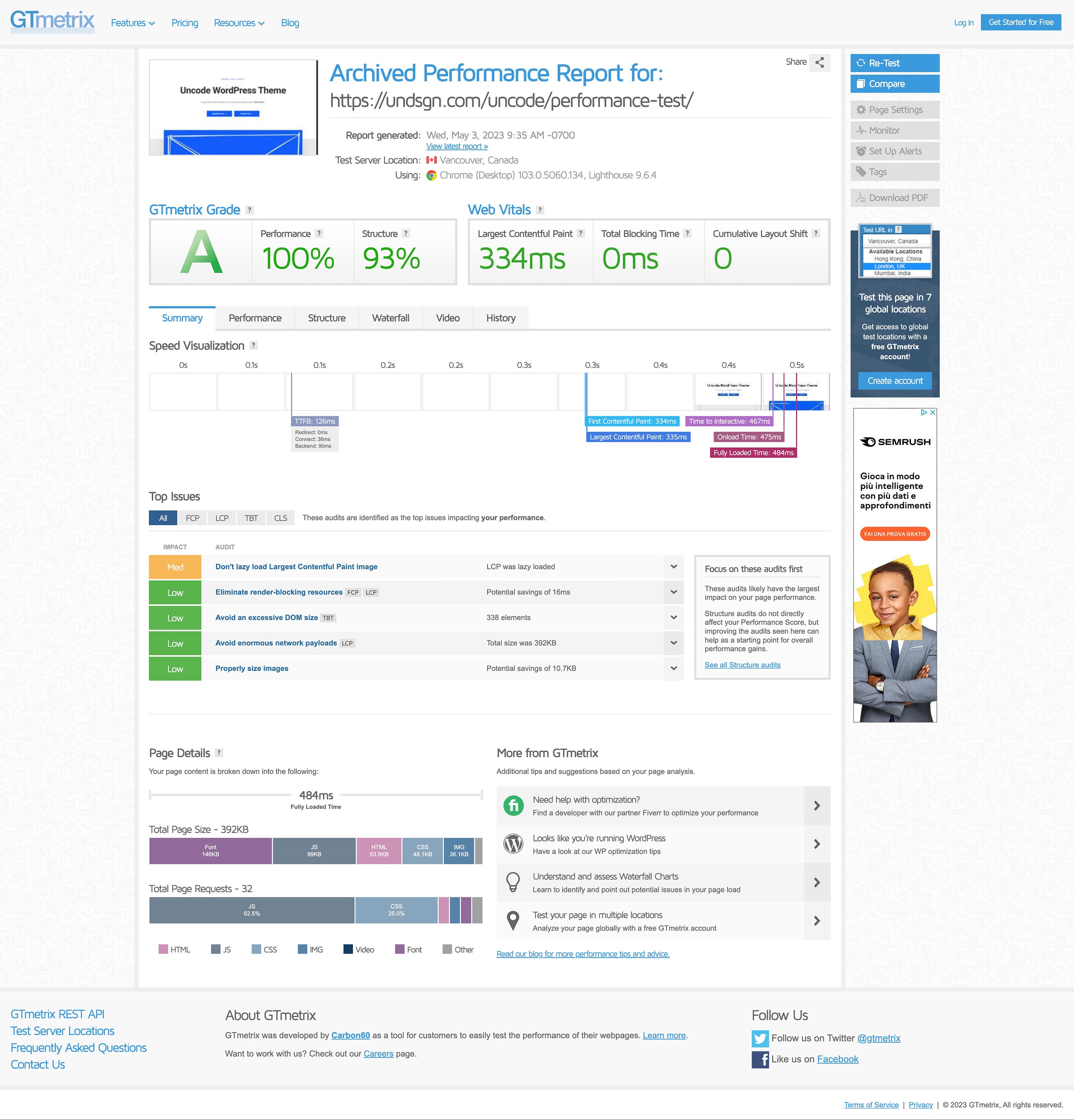
I tested the demo link of the theme with Google PageSpeed Insights and GTmetrix, and I found a performance score of 62%, which is different from the results displayed on your site. Despite the advertised performance, the scores don’t seem to match.
Are there any specific configurations or additional optimizations needed to achieve similar performance results? Thank you in advance for your assistance.
https://pagespeed.web.dev/analysis/https-undsgn-com-uncode-performance-test/m8z9gyws6m?form_factor=desktop
https://undsgn.com/uncode/wp-content/uploads/2023/05/performance-Archived-GTmetrix.jpg
Hello,
Before making a purchase, I wanted to confirm whether the Uncode theme offers the capability to create a Mega Menu. If it does, could you please provide an example website where this feature is demonstrated?
Additionally, is there a list of plugins known to have compatibility issues with the Uncode theme? It would be very helpful to know this in advance.
Thank you in advance for your assistance!
Hi kavkazberg1! The Megamenus supported by Uncode are those visible on our demo. If you need Megamenu with e.g. images and other content, you can use popular plugins that work with Uncode such as QuadMenu or Uber Menu, more information here in the Megamenu section: https://support.undsgn.com/hc/en-us/articles/213457169-Megamenu
thx
Thank you for the confirmation!
Is there php 8.3 support?
Hi supermex! We strongly discourage the use of PHP 8.3. As you can see, from this official resource, this is in “Beta Support” for WordPress itself: https://make.wordpress.org/core/handbook/references/php-compatibility-and-wordpress-versions/
I have a question regarding theme registration. I’m making a website for a client. Currently, he has a working website on the domain. When my work is done with the web design using the Uncode theme, we will transfer this new design to the domain.
So, I’m now building a new web design under a temporary domain name. Would transferring it from the temporary to the proper domain be easy?
Hi svetpkv! If you are in this migration scenario, you just need to drop us a message so we can help: https://themeforest.net/user/undsgn
Is it possible to add particular styling to a single word in a post title? I am using the posts module which pulls in the post details. I need one word from the title to be styled with a different font but the module pulls in the title as a whole. I could add in custom HTML to the page that uses the module but I don’t know if the module will override nor do I know if I can access the HTML of a single post page.
Hi harshilvarsani! If I understand you correctly it’s possible, please give a check to this short screencast, we have a bold in the title that is stamped also on the Posts thumbnail (and also in the final article): https://undsgn.d.pr/v/C3g2QO
unfortunately, the theme is not fully rtl support like they said. the theme options are hard to use and when I change something isn’t applied. regret to buy it
Hi AmerClear! We are not sure what difficulties you had, but as you can see other users create great sites and RTL compatible as well: https://undsgn.com/uncode/showcase/
Question: I’ve been battling some mind-boggling and intermittent performance issues on a couple of sites that I have which use Uncode w/ WooCommerce. I’ve optimized everything imaginable on them, but will have load times ranging from .5 sec to 20 secs …. from the same device or testing service … with no obvious reason. Are there known caching settings we should watch out for w/ WooCommerce?
Hi jackcolton1! Nothing special, as you can see from our demo and from the showcased websites loading times are pretty different from .5 to 20 seconds, ex: https://undsgn.com/uncode/showcase/
In the case please try to share your URL so we can check if there is something you are missing or we note a possible problem.