5482 comments found.

hi, i have disable comments so i can aprove them manualy like this:
Settings > Discussion > Before a comment appears (i have checked it) and Comment must be manually approved
still customers can leave review have i missed something?
The reviews are comments, but they are not controlled from WordPress comments. They are just saved like comments. The reviews are automatically published when added -
From our help – https://help.wprentals.org/article/how-to-rate-a-property-after-booking-was-completed/ After submission by the user, reviews are immediately visible on the property’s listing page and on owner profile page.
Admin can moderate them from wp-admin – comments but they are automatically published
Thank you
is it possible somehow to not be automatic.
Hi. There is no quick custom code we can share for this. I added the request to wishlist and we will review how we could add a control for this in a future theme update. Thank you
hello, i just found some pages with this RentalsClub APi Page Template (rentalsclub.php) and rentalsclub.org in function.php
is this ok?
Hi. Rentals Club is disconnected, but the pages can still exist. It is ok. Thank you
There is a conflict with Elementor plugin version 3.26 and above. The latest version that works with wprental is 3.25.11.
When is the update with the fix comming?
I forgot to update the wprentals Elementor. It is fixed now.
Hello. Thank you for the follow up. Yes, we already have the fix released since December but the theme and included plugins must be updated before elementor update. I am glad you manage to solve this
Please use our client support https://support.wpestate.org/ to assist. This is also a private support where you can send us your site details (url and temporary wp-admin access). Our standard office hours are Monday – Friday, 9AM-5PM Europe timezone.
If you wish my assistance to register in support please send a message from here with the buyer account – https://themeforest.net/user/wpestate
Thank you
Hi guys!
I am interested in purchasing the WP Rentals theme, but I have a key question before making my decision.
My goal is to see all reservations in a single Google Calendar using iCal.
1 – Does the theme allow exporting a single iCal feed with all reservations, or does it generate a separate feed for each property? 2 – If all reservations can be viewed in a single calendar, how do they appear in Google Calendar? Does the event title include the property name to differentiate them? I would really appreciate a clear answer, as I need to confirm this before purchasing the theme.
Thank you!
I wanted to add one important detail to my previous question. On the website, there will be only one owner managing all the properties, and user registration will be disabled.
This means that all reservations should be managed under a single account. Does this change how the iCal feed works or how reservations appear in Google Calendar?
Thank you!
Hello. The ICAL feed is by property. You have 1 ical for each property, not for all.
You can be single owner – single site admin. You can add multiple properties and each property has its ical. In google calendar you can add multiple ical feeds as far as I know.
Help https://help.wprentals.org/article/icalendar-import-export/
Thank you
Hi. Hello, I would like to know if this theme allows configuring two types of rentals simultaneously: daily and annual.
Hello. Thank you for the comment.There is no option to charge annually for a booking. And there is no option to have 2 type of booking at the same time. We have Daily OR Hourly, but it is one or the other when you add the listing. User can only choose from 1 type of booking in front end.
But what you wish is not possible.
Thank you
hello, I read some information in your support board.
https://themeforest.net/item/wp-rentals-booking-accommodation-wordpress-theme/12921802/comments?term=smoobu&from_buyers_and_authors_only=0&order_by=newest.i have some problems wiht smoobu integration I understood that unfortunately your theme does not synchronize easily with smoobu. the reason why I purchased your theme yesterday is only and exclusively for that. I like your theme a lot but the integration with smoobu is essential for me, otherwise it makes no sense for me to have this theme. So I ask you is it possible to integrate it without hours of programming and additional costs for me? if it is not possible, which I fully understand, is it possible to have a refund of the expense, because at the moment I bought a theme that I will not use. I hope you can understand. thank you very much
Hello. The conversation you mention explains that there is no Smobuu integration via API. You can use ICAL feed to import / export calendar availability with any platform that supports Ical, and smobuu does that. But we do not have API integration done included in the theme.
While the theme has API support, and lets you use that API to create custom applications, we do NOT have Smobuu api.
Please send a refund if you misunderstood the comment on the forum – it clearly explained we do not support that, but I am not sure why it would be understood as it is different.
The refund request can be sent here https://themeforest.net/refund_requests/new
Thank you
unfortunately I read the discussion after purchasing the theme. And if unfortunately I can’t integrate it with smoobu, this theme, even if I like it a lot, I can’t use it. Thank you very much. I really appreciate your support. I will request a refund via the link you provided.
hello your template doesn’t get connect with airbnb and other portal ….it’s two weeks right now thast i’m waiting for a solution…this week u didn’t help me at all but just to find pure excuse to givew the fault to other problem hosting relate, but i also changed the hosting and the template doesn’t weork….like this is not gonna work at all.
Hi,
Thank you for your comment.
We are not aware of any iCal synchronization problems.
You need to make sure that the below details are checked for the iCal to work:
1. Have SSL installed correctly 2. Have an internal booking, regardless if it is in the past. 3. The listings need to be Published, Ical synchronization will not work for listings saved as draft or pending. 4. The Ical synchronization will not work if you have a maintenance option enabled for your site.
Please use our client support https://support.wpestate.org/ to assist. This is also a private support where you can send us your site details (url and temporary wp-admin access). Our standard office hours are Monday – Friday, 9AM-5PM Europe timezone.
If you wish my assistance to register in support please send a message from here with the buyer account – https://themeforest.net/user/wpestate
Thank you
Good evening, Pre-purchase question:
I would like to know if the theme takes into account the refund like a total and free refund 3 days after the reservation and other options related to this
Hello. Thank you for the comment.
The WPRentals theme does not have a built-in refund management system or options for handling refunds, including a total and free refund 3 days after the reservation. The theme processes payments to the site admin only, and there is no functionality for customers to request refunds from the organizer or for a refund manager in the backend.
Thank you
Is there still a reservation cancellation system?
Hello. The theme does not have an automatic cancellation system. You can add info about cancellation, but there is no automatic system.
Thank you
if we use woocommerce payments, do you have if we can use a woocomerce refund plugin directly?
And thanks for your feedback, I will buy the theme, I just want to know what is not available with the theme to find adjustments on my side
Hello. There is no way to refund via WooCommerce either. What you wish is not possible I am afraid. Thank you
Pre sale question ; Hello! Can I automatically adjust the daily rate according to the length of stay, with each owner setting their own pricing rules?
Hi,
Thank you for your comment.
The owner can set a custom price per period from the user dashboard submission form. We have a video in this article that explains the process: https://help.wprentals.org/article/how-to-choose-different-prices-for-different-dates/
Thank you,
thank you for your answer
I am interested in purchasing this theme to build a parking rental platform, as the pricing structure is quite similar to apartment rentals. Before proceeding with the purchase, I want to ensure that the theme fully supports my needs without requiring any additional paid customization services.
Custom Pricing Rules: Can advertisers (listing owners) set custom pricing rules such as:
1 day rental: €35 per day Between 5 and 10 days: €30 per day More than 10 days: €20 per day Does the theme natively support such tiered pricing structures, or would I need an extra plugin or customization? Payment System: How does the payment process work?
Does the platform admin collect all payments and then manually transfer earnings to the listing owners? Or is there an automated system where the admin receives a commission, and the remaining amount is sent directly to the advertisers? I appreciate your response and clarification on these points before making a decision.
Best regards,
Hello.
Regarding 1st question
Custom Pricing Rules: Can advertisers (listing owners) set custom pricing rules such as:
1 day rental: €35 per day Between 5 and 10 days: €30 per day More than 10 days: €20 per day Does the theme natively support such tiered pricing structures, or would I need an extra plugin or customization? Payment System: How does the payment process work?
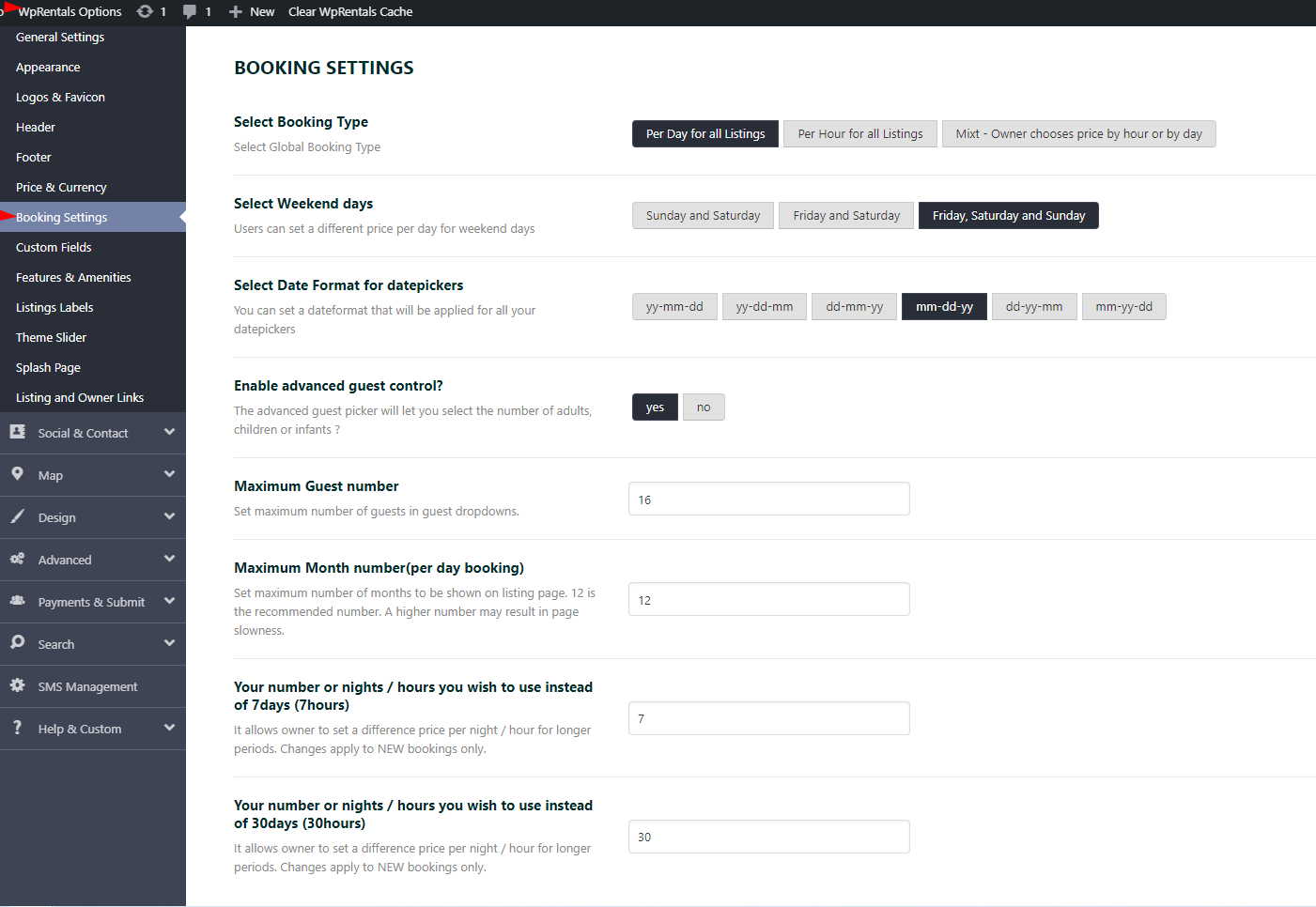
Answer The theme allows for: - A price per night. - A price per night for bookings over 7 nights. - A price per night for bookings over 30 nights.
You can change the values for the 7 and 30 nights in the theme options.
You can put 5 and 10 – as your example
Demo https://main.wprentals.org/properties/sunny-2-bedrooms-in-the-haight/
Screenshot from our help with theme options that control this number https://help.wprentals.org/wp-content/uploads/2018/05/Screenshot_14.png
You can disable guest too – help https://help.wprentals.org/article/how-to-manage-guest-options/#c_wpestate_id
But I am not sure if this is all you need as I do not know your business model to confirm. I can confirm what the theme can support or not.
Regarding Does the platform admin collect all payments and then manually transfer earnings to the listing owners? Or is there an automated system where the admin receives a commission, and the remaining amount is sent directly to the advertisers?
In the WPRentals theme, the platform admin collects all payments for reservations. There is no automated system in place where the admin receives a commission and the remaining amount is sent directly to the listing owners. Instead, the theme does not facilitate direct payments to owners; all payments are processed to the site admin only.
This means that any earnings for the listing owners would need to be managed manually by the admin, as the theme does not support automatic transfers to the owners.
If you have any further questions or need clarification on specific features, feel free to ask!
Hello, I see there is an option to submit an inquiry instead of instant book. Question, with that option, would the customer be able to see calendar availability? Or is there only the option for them to request dates? Also, is it possible to have them check a box to agree to the terms and conditions when they book? Please advise. Thanks!
Hello
Regarding I see there is an option to submit an inquiry instead of instant book. Question, with that option, would the customer be able to see calendar availability? Or is there only the option for them to request dates?
Answer
In the WPRentals theme, the contact form does not show availability. Instead, it allows users to send inquiries about any date without displaying real-time availability information.
To show availability, you need to use the booking form instead of the contact form.
The availability calendar section allows users to see booked dates – https://prnt.sc/pN9rUWd0UdKV
Regarding Also, is it possible to have them check a box to agree to the terms and conditions when they book?
If you use Booking Form – (and not contact form) you can enable terms and conditions and specify the link with your content for this section
Help https://help.wprentals.org/article/theme-options-listing-page-settings/
To manage the property page display options navigate to Theme Options > Listing Page
Demo https://barcelona.wprentals.org/properties/73-travessera-de-gracia/
Thank you
Ok, thanks for the info!
You’re welcome!
Will you please confirm that when someone clicks on the “I consent to the terms and conditions” that they actually have the ability to see those terms and conditions after clicking a link or viewing the contract page?
Hello. Thank you for the follow up. When someone clicks on “terms and conditions” link – they will be redirected to a page admin creates and publishes. The content you put as admin in that page is visible as long as the page is published and the link is added in theme options as link for terms and conditions in booking form.
Thank you
Great – thanks for the clarification.
You’re welcome. Thank you as well for the follow up
before buy this theme wanted to if this is designed only for renting house or property only? Or can work with any other category like electronics, baby product renting etc.?
For example if use theme Paphos Rentals Demo, would this can configured for renting anything or just hotel rooms etc.
Hi,
Thank you for your comment.
The theme supports object rental as well, regardless of the demo that you import, you can change options. The listings pages will be global, so you can adjust details for one type of booking.
Also, the booking form does not have a quantity option.
Thank you,
Thank you so much for the response. Great to hear.
I’m considering purchasing the WP Rentals theme for my website and want to ensure it meets my requirements. Here’s what I need:
Search & Filters: Users should be able to search by dates and filter by criteria like heated pool, sea view, number of people/bedrooms, etc. Key Features Display: Highlight amenities such as air conditioning and private pools. Automation: Automated booking confirmations, payment reminders, receipts, and payment deductions. Upselling Options: Ability to offer extras like transfers, late check-out, and early check-in. Third-Party Integration: REST API support to display external products/services. Map Functionality: Display property locations on a map. Access Control: Owners: Full access to their listings. Third Parties (Cleaners, Key Holders, etc.): Restricted access without financial details. Media Support: Ability to showcase pictures and videos. Payment Methods: Integration with Stripe, PayPal, and bank transfers. Would WP Rentals support all these features, or would additional customization be required?
Hi,
Thank you for your comment.
Search & Filters: Users should be able to search by dates and filter by criteria like heated pool, sea view, number of people/bedrooms, etc. Key Features Display: Highlight amenities such as air conditioning and private pools.- You can set the search form to look by dates and Features and Amenities.
Also, the theme will send one automatic reminder email for payment 3 days before the booking period will start.
Automation: Automated booking confirmations, payment reminders, receipts, and payment deductions. --You can use the Instant booking option that will bypass the owner-issue invoice manual step and prompt the guest to pay directly.Upselling Options: Ability to offer extras like transfers, late check-out, and early check-in. —The theme does not have functionality for transfers, late check-out, and early check-in.
Third-Party Integration: REST API support to display external products/services. —The theme does not have this option. With the theme APi option, you might be able to include it in the theme but this requires custom development.
Map Functionality: Display property locations on a map. - You can display the listsing pins on the map.
Access Control: Owners: Full access to their listings. —Each owner will have full control over his listings and bookings.
Third Parties (Cleaners, Key Holders, etc.): Restricted access without financial details. —The theme does not have this functionality.
Media Support: Ability to showcase pictures and videos. —You can upload images in each listsing and you can include a video hosted by Youtube or Vimeo.
Payment Methods: Integration with Stripe, PayPal, and bank transfers.—You can use theme PayPal, Stripe or Wire transfer or you can use WooCommerce for payments. the theme will not support payments to owners, just to admin and the owner payments will be managed outside the theme.
Thank you,
Does each property have its own ical?
For each property can i add other sources or ical e.g. booking.com airbnb.com etc?
Hello. Thank you for your interest. Yes, each property in the WPRentals theme can have its own iCal link. You can add iCal links from other platforms such as Airbnb and Booking.com to sync booked dates.
The theme allows you to import and export calendar feeds using the iCalendar option, which means you can set up your property to sync with other platforms.
For more detailed instructions on how to set this up, you can refer to the help article here: https://help.wprentals.org/article/icalendar-import-export/If you have any further questions or need assistance with specific settings, feel free to ask!
Thank you
Hi,
I’m using your template for an accommodation website, and I have a question about calendar synchronization with iCal.
On Booking.com, the five apartments I want to sync are listed under a single listing, not as separate ones. Is it possible to sync the calendars of each apartment individually on my website using iCal in this setup, or does it only work if each apartment has its own separate listing on Booking?
I appreciate your help and look forward to your response.
HI,
Thank you for your comment.
The theme does not support multiple rooms added in one listing and the icalendar feed will work per listing.
The Ical will work for separate listings.
Please use our client support https://support.wpestate.org/ to assist. This is also a private support where you can send us your site details (url and temporary wp-admin access). Our standard office hours are Monday – Friday, 9AM-5PM Europe timezone.
If you wish my assistance to register in support please send a message from here with the buyer account – https://themeforest.net/user/wpestate
Thank you
Hello. I install th theme. I want to remove the price information. I want a reservation to be created without a price. Can you support?
Hi,
Thank you for your message.
Bookings cannot be registered without a price, but you can replace the booking form with a contact form. Based on the message received from the guest, you can send a quote.
https://help.wprentals.org/article/hide-booking-form-and-replace-with-owner-contact-form/Please use our client support https://support.wpestate.org/ to assist. This is also a private support where you can send us your site details (url and temporary wp-admin access). Our standard office hours are Monday – Friday, 9AM-5PM Europe timezone.
If you wish my assistance to register in support please send a message from here with the buyer account – https://themeforest.net/user/wpestate
Thank you
Latest update broke our site and your support doesn’t work to login and report:
[19-Feb-2025 14:58:16 UTC] PHP Fatal error: Uncaught Error: Call to undefined function wpestate_generate_property_slider_image_ids() in /home/site/public_html/wp-content/themes/wprentals/templates/property_page_templates/property_page_templates_section/masonary_gallery_property_page.php:24 Stack trace: #0 /home/site/public_html/wp-content/themes/wprentals/templates/property_page_templates/listing_page_4.php(26): include() #1 /home/site/public_html/wp-content/themes/wprentals/single-estate_property.php(138): include(’/home/site/...’) #2 /home/site/public_html/wp-includes/template-loader.php(106): include(’/home/site/...’) #3 /home/site/public_html/wp-blog-header.php(19): require_once(’/home/site/...’) #4 /home/site/public_html/index.php(17): require(’/home/site/...’) #5 {main} thrown in /home/site/public_html/wp-content/themes/wprentals/templates/property_page_templates/property_page_templates_section/masonary_gallery_property_page.php on line 24
Hi,
Thank you for your comment.
Please make sure that your theme update is complete and that you updated the theme-included plugins as well.
This is our documentation for theme update: https://help.wprentals.org/article/how-to-update-the-theme-and-plugins/
Please use our client support https://support.wpestate.org/ to assist. This is also a private support where you can send us your site details (url and temporary wp-admin access). Our standard office hours are Monday – Friday, 9AM-5PM Europe timezone.
If you wish my assistance to register in support please send a message from here with the buyer account – https://themeforest.net/user/wpestate
Thank you
Viewing bookings in the back end seems a little displaced. Under “My Bookings” there doesn’t seem to be a way of adding or even editing an existing booking that I can see. To do this, I think I have to go to ‘My Listings -> Edit property -> Calender’ and then I see random booking ID’s in a calender view, but no way to see a booking description and no way to edit a booking (change description or extend the date for example). Am I missing something here? Thanks.
Hi,
Thank you for your comment.
Existing bookings cannot be edited. To ensure the booking calculations are correct, you need to delete and add the booking again with the new details.
The owner can block dates manually from ‘My Listings -> Edit property -> Calender’
HELP: https://help.wprentals.org/article/issue-invoice-reject-booking/
Please use our client support https://support.wpestate.org/ to assist. This is also a private support where you can send us your site details (url and temporary wp-admin access). Our standard office hours are Monday – Friday, 9AM-5PM Europe timezone.
If you wish my assistance to register in support please send a message from here with the buyer account – https://themeforest.net/user/wpestate
Thank you
When adding a property under the ‘price’ section, the ‘price adjustments table’ (which is excellent by the way) seems to be unusually hidden away under the ‘SAVE’ button so easily missed (and a critical part for me). How can I get this moved into the main area with all the other information? Thanks
Hi,
Thank you for your comment.
The custom price settings are displayed at the end of the page and you might be able to move them with code changes.
Please use our client support https://support.wpestate.org/ to assist. This is also a private support where you can send us your site details (url and temporary wp-admin access). Our standard office hours are Monday – Friday, 9AM-5PM Europe timezone.
If you wish my assistance to register in support please send a message from here with the buyer account – https://themeforest.net/user/wpestate
Thank you
Hi, Is it possible to have payments into different bank accounts, depending on the rental property?
And also, can we integrate Guesty API booking system?
Hi,
Thank you for your comment.
The theme does not support payments to owners. Payments will be sent to the admin only, and payments to the owner need to be managed outside the theme.
Integrating the Guesty API booking system requires custom development.
Thank you,
In the listing, we have a maximum of 3 adults and 2 children are allowed, but I can’t find where to differentiate the guests, please, can you help me?
Hi. You can enable guest selector with advanced guest picker in theme options https://help.wprentals.org/article/how-to-manage-guest-options/#b_wpestate_id
You can use max guests too – and include children as guest, but you cannot force users to select 2 children.
If you have max 5 guests they can select 5 children or 1 adult and 5 children or 2 adults and 3 children or 3 adults and 2 children or 4 adults and 1 child or 5 adults.
The separation does not have a max type of guest option (adult or child). Only max guests in total.
Please use our client support https://support.wpestate.org/ to assist. This is also a private support where you can send us your site details (url and temporary wp-admin access). Our standard office hours are Monday – Friday, 9AM-5PM Europe timezone.
If you wish my assistance to register in support please send a message from here with the buyer account – https://themeforest.net/user/wpestate
Thank you