6358 comments found.
Hello. On Android smartphones and tablets, no keyboard appears when you press the search button.
https://lookboat.com/Hello,
Thank you for pointing out the issue. Unfortunately, this is a bug. We’ll fix it in the next release and notify you once it is published.
Hello,
We just released Impreza 8.39, which fixes the above-described issue. Please update your theme.
Thank you! Probably you can help me with list filter, he doesn’t work https://lookboat.com/current/motorboats-for-sale/ https://prnt.sc/jaEo2AlnU4Uf
If you use faceted filtering, go to Theme Options > Advanced and press the “Index Filter Items.”
If you need further assistance, please create a ticket on the Support Portal and our team will gladly assist and guide you.
I can`t, You can’t create tickets because your support for Impreza has expired (check your Licenses page).

Hello. A question, please: how can we add and display featured images on blog category pages? Thaks a lot and Best Regards
Hello,
You can create an image-type custom field with the Advanced Custom Fields plugin and assign it to the needed taxonomy (categories). After this, you can add this image to a Page Template that the archive uses with the Post Custom Field element.
If you need further assistance, please create a ticket on the Support Portal and our team will gladly assist and guide you.
We did it already… exactly like that (ACF) and the image does not apear…
any comment?
Hello,
Sorry for the belated reply. Please create a Support Ticket and share an example page URL so we can check what went wrong.
When sharing the site in maintenance mode using a private link, page specific overrides are not working.
Hello,
This is a complicated question. Please create a ticket on the Support Portal and provide your WP admin credentials via private reply so our support team can investigate. Thanks in advance!
“Impreza Courses” demo does not imports completely. All the products which gets imported have only textual section which says.
Great things are on the horizon
Something big is brewing! Our store is in the works and will be launching soon!
Even the “Courses” main menu link also loads a page which shows same text.
Hello,
In the latest WooCommerce versions, the shop is set to “coming soon” mode by default, which you can see in the horizontal panel at the top of your WordPress admin area. Change the store status to “Live”, and everything should appear correctly.
hi, sir..
this will be a major release?
Last Update 1 September 2025
Hello,
Please clarify your question. I’m not sure which update you referred to.
right here, on themeforest: https://prnt.sc/UogSYFwf4IUJ
?
Hello,
The date you referred to refreshes every time you change the items inside the relevant archive. In this case, a new version of Revolution Slider was uploaded on September 1st, so it wasn’t a theme update.
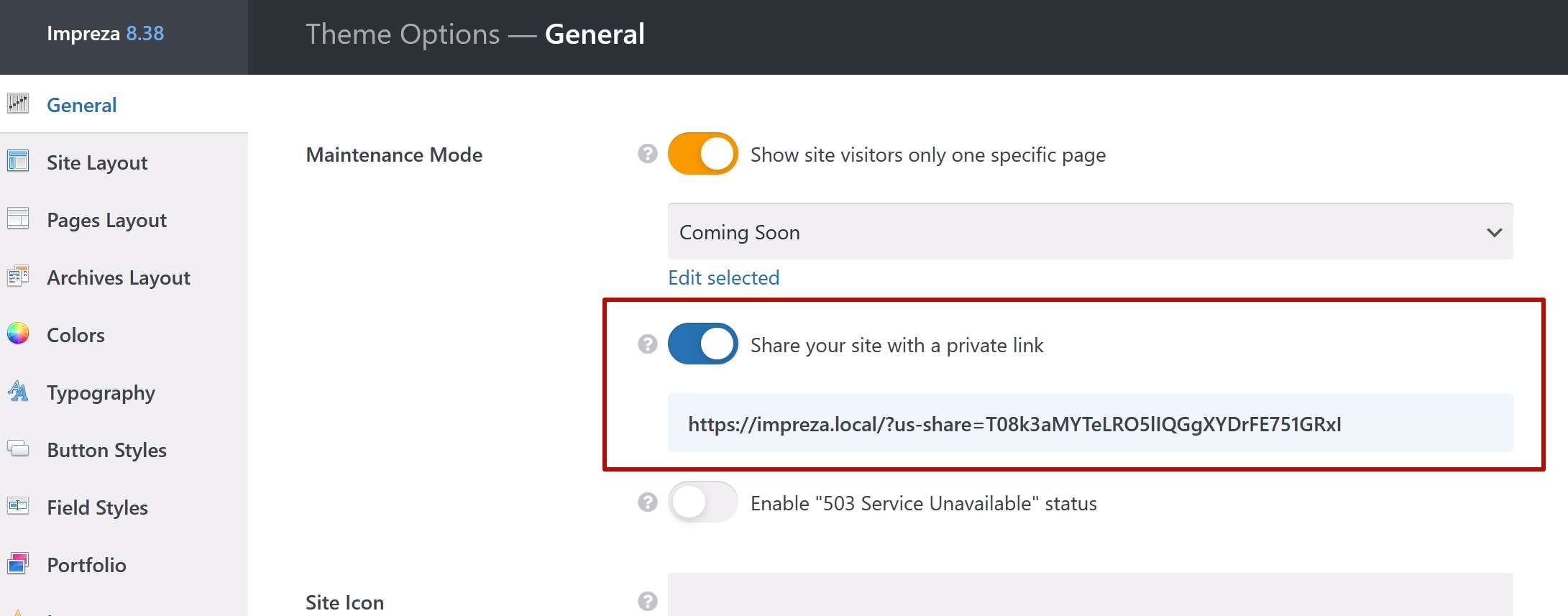
My development site which is at a subdomain of my main domain, I always see the message on front end that “Site Is Under Construction”.
Suppose I wanna make some changes, then as a standard development process, I will make changes in development site, see the changes as how it looks and then migrate changes to production.
But here, the front end of development site always show “Site under construction”!
How can I see the changes on my development site before migrating them to production site.
Hello,
In Impreza 8.38, we added a feature that allows you to visit the development site via a private link. Please give it a try.
Hello, I have noticed that when I’m adding reusable block with columns to the menu the structure of reusable block is flatten and displayed in one column. Is there any way to avoid this feature? I will be easier, faster and more controlled to create mega menu as one reusable block linked in menu, not separate block for every column. Best regards
Hello,
When you add a Reusable Block to the menu at Appearance > Menus, there’s a checkbox “Exclude Rows and Columns” that is active by default. Uncheck it, and your Reusable Block will use its rows and columns structure.
Can this be installed on LOCAL HOST machine. Whats required to make it work ? Lic etc….
Hello,
If your local site has an Internet connection and you have an Impreza license, you should be able to install, activate, and use Impreza on the local site as well.
Hello,
There is an error in the grid layouts – the custom link doesn’t work after the update.
Hello,
This case needs more data to investigate its reason. Please create a ticket on the Support Portal and provide your WP admin credentials via private reply so our support team can investigate. Thanks in advance!
I can’t add it in the support, but please check it on a custom installation: create a new Grid Layout and set the link Additional Settings → Custom Link. It works in version 8.37 but not in 8.38
Thank you for sharing details. I passed the issue on to techs. We’ll notify you once the update with the fix is published.
That will be great, thank you. We have many custom links on the site, and after the update they are not working, which is creating some issues for us.
Hello,
We have just released Upsolution Core 8.38.2, which should resolve the issue. Please update to the latest version.
Hello,
I’ve updated to version 8.38.2 and everything works perfectly now. Thank you for your quick support!
Best regards, MM
Hello, I have noticed that on older smartphones and tablets, no keyboard appears when you go to the search function. According to my information, this seems to affect older Android models. The keyboard appears very briefly and then disappears again. Does anyone have any idea what might be causing this?
Hello,
Multiple possible reasons, including conflicts with third-party plugins, custom code, or browser extensions, could cause it. If you wish to investigate the issue, please create a ticket on the Support Portal.
Update: This bug also affects the latest Android system and was only noticed today after the last update was installed. According to the customer, it was still working perfectly yesterday. Perhaps this will help with the investigation?!
Please create a ticket at the Support Portal and share an example URL and the website credentials in a private reply inside that support ticket.
I did it. Thank you for support.
Hi. I’m trying to activate the theme on a development domain without SSL. During activation, it redirects to the domain with SSL. But that domain is redirecting to the hosting’s main page. So, basically, I can’t activate the theme. I never had this issue before on the same hosting. Is there anything I can do to redirect to http during activation instead of https?
Hello,
Unfortunately, we can’t replicate the issue in our testing environment. Please create a support ticket and share your website and FTP credentials in a private reply to this ticket so our techs can investigate.
There are problems with the latest Impreza and Gravity Forms. Something with the style sheet. Example: field Address, choose Country, and the select arrow will multiply and fill the whole field. Also, after updating the theme, other GF styles go a bit off. Tested on multiple sites after updating.
Hello,
Please use the contact form here to email us an example page URL and access to your site so we can investigate.
I cannot activate this theme. It says 502 bad gateway
Hello,
Sorry for the inconvenience. There was a server-side issue; it should now be working correctly. Please give it another try.
502 Bad Gateway on help.us-themes.com. Thank you to reopen access as soon as possible.
Hello,
Sorry for the inconvenience. There was a server-side issue; it should now be working correctly. Please give it another try.
Thanks and best regards.
Trying to login into the support portal https://help.us-themes.com/, bad gateway too.
Hello,
Sorry for the inconvenience. There was a server-side issue; it should now be working correctly. Please give it another try.
Hello
I am trying to updated Theme and Plugins coming within the Theme, but getting “Update failed: Download failed. Bad Gateway”.
Trying to login into the support portal https://help.us-themes.com/, bad gateway too.
Regards,
Simon
Hello,
Sorry for the inconvenience. There was a server-side issue; it should now be working correctly. Please give it another try.
Hello
Thanks, yes, it is working now.
Regards,
Simon
I cannot activate the theme, or go to your support page. It says bad gateway. Please fix.
Hello,
Sorry for the inconvenience. There was a server-side issue; it should now be working correctly. Please give it another try.
Hello The color change button in the Fashion Shop demo doesn’t work. It doesn’t change the color.
<input class=”screen-reader-text” type=”checkbox” name=”us-color-scheme-switch”>
Hello,
Unfortunately, I am unable to replicate the issue. If you refer to a copy of the demo site, please share a URL of an example page.
I haven’t made any changes since importing the demo.
This case needs more data to investigate its reason. Please create a ticket on the Support Portal and provide your WP admin credentials via private reply so our support team can investigate. Thanks in advance!
I haven’t made any changes since importing the demo.
The Color Scheme Switch button in the header doesn’t work.
Please create a support ticket and provide your WP admin credentials via private reply
Hi, after the last update smooth scrolling stopped working. What could be the reason?
Hello,
I just checked, and it works on our demo site. Please check if the issue is due to caching.
This is what is written in the developer panel:
SmoothScroll.min.js?ver=3.21.0:1 [Intervention] Unable to preventDefault inside passive event listener due to target being treated as passive. See https://www.chromestatus.com/feature/6662647093133312 e @ SmoothScroll.min.js?ver=3.21.0:1
Not related to caching, checked.
please help me where to look for the problem. Thank you.
Please use the contact form here to email us the example page URL and your website credentials so we can take a look.
Sent all the info
hi, sir,
i wanna delete an row from a page. but i dont see the controls at corner right. i am using v 3.86.1
is it a bug design? https://prnt.sc/k9Ucpgk7Fvd9
Hello,
Try updating WPBakery to its latest available version.
it was WPBakery Page Builder 8.2… i have updated to 8.5, and is ok. thank you!
hello i wanna make a variation in product page like color shows with colors not dropdown and size checkbox
Hello,
Unfortunately, our theme doesn’t provide such a feature. You can search for third-party plugins developed for it.