338 comments found.

Dear
I’m trying to set prettyPhoto to use as gallery and set rel=”prettyPhoto[pp_gal] as described in manual but not working on your template.
What I need to do??
Thanks and sorry about the english
Did you check the error in your browser console?
There is no error in browser console! ;( the gal just not work! I already tryed add the [galname] in your native Code and do not work too!
Can I see the code or the page? Thanks
Hi, the fist problem: http://sonoconvite.com/cadastro The select just wok in IE (safari and chrome not) Second problem: prettyGalery Login with user: admin and pass: pas123456 using this page http://sonoconvite.com/ Then go to this url http://sonoconvite.com/fotos to see that the option [gal_name] not work.
The problem with select was resolved. Now I just need you help in PrettyGalery
Hi themepixels, any news about prettyGalery?
Is there an ETA on the frontend theme? TYIA.
I can’t tell you right now i got super busy sorry
Hello,
Considering this beautiful admin theme. Are you able to edit HTML pages within this template, similar to GoDaddy’s Page Builder?
Thanks!
No, this template is static but you can use this template if you want to create one
Hi – Do you know how I can make one of my menu items in the headerbar “active” when selected? I’m using a sticky top navigation bar. The 1st li tag contains an icon that opens and closes the sidebar (class=”sidebar-toggle”). The 2nd, 3rd, and 4th li tags all automatically include the “active” class when selected because they simply link to a url. Any ideas on how to add the “active” class dynamically to the 1st li tag which has the ”sidebar-toggle” class? Here’s my navigation bar:
<ul id="navbar-menu" class="nav navbar-nav collapse"> <li class="button1"> <a data-enabled="true" class="sidebar-toggle button1"> <em data-placement="bottom" data-toggle="tooltip" class="tip" data-original-title="button1" /> </a> </li> <li class="button2"> <a href="#" class="button2"> <em data-placement="bottom" data-toggle="tooltip" title="" class="tip" data-original-title="button2" /> </a> </li> <li class="button3"> <a href="#" class="button3"> <em data-placement="bottom" data-toggle="tooltip" title="" class="tip" data-original-title="button3" /> </a> </li> <li class="button4"> <a href="#" class="button4"> <em data-placement="bottom" data-toggle="tooltip" title="" class="tip" data-original-title="button4" /> </a> </li> </ul>
I know it has to do with this .js code but I’m not sure how to edit it:
    //===== Toggling active class in accordion groups =====//

    $('.panel-trigger').click(function(e){
        e.preventDefault();
        $(this).toggleClass('active');
    });
any suggestions on speeding up this theme? http://tuneape.com ... thanks, i love the theme by the way and my users are responding well to it
It’s not about this template that made your web app very slow, it’s about your code maybe that pulls up data from your server or your server is slow
thank .
Hello
I read on a page on this website that bracket theme is no longer being sold. I cant find the page but is this correct as understandably i dont want to use a theme that is unmaintained and unsupported. It is a greate theme
Hello
I sent a bug report but didnt receive a reply
If you have a dynamic data table inside a panel, the panel does not resize properly and the datatable goes outside the panel?
I dont know if this fault lies with the datatable, bootstrap or the theme?
Thanks
sorry, i wasnt clear, it is the content div that doesnt expand properly with the datatable. The panel and datatable run over the top of it. Based on that i presume the error is with the theme. thanks
also it says theme is no longer for sale for wont be updated and maintained? is this correct?
Hi, the problem lies in the table specially if you have many columns. Do you have a page or screenshot where I can see what you mean?
Where did you know that this theme is no longer sold? If you can comment on this that means this theme is still existed
Hello
Has this theme been used/tested with Kendo components?
thanks
Kendo is different ui framework. This template used bootstrap framework so it’s never been tested in our side.
how do i make the search button clickable—> http://tuneape.com/explore.asp
There is no search button in the search form. User should hit enter key to search
The ckeditor skins folder is missing themepixels/skin.js. Can you please send or upload the skin.js file?
There is no skin.js file in the skins even if you check ckeditor’s default skin.
Hi,
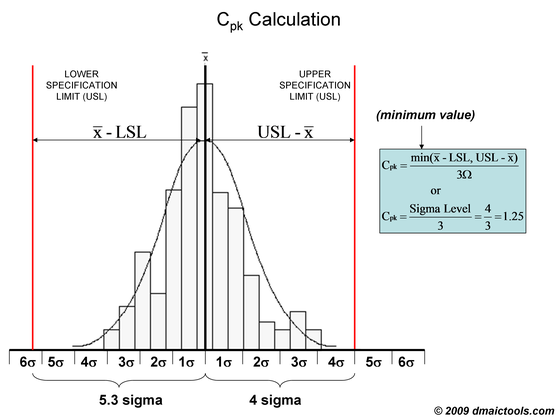
Can I generate graph like this -> http://www.dmaictools.com/wp-content/uploads/2009/11/sigmalevel0002.PNG
Thank you.
No you can’t generate it from this template. You need a third party script that can display something like that.
/css/style.default.css (Line 809)
There is character ” ` ” that breaks something during compiling (Ruby on Rails). Check the code and eliminate that character. Great theme BTW!
.pageheader .fa-file-text {
    padding: 6px 10px;`
}
-webkit-box-shadow: 3px 3px 0 rgba(12, 12, 12, 0.05)
Thanks for letting me know.
There’s a problem with the Block Styled Form. In the example you’ve put together this is not actually using a <form> tag so it works fine. But when inside a <form> and using columns for .form-group loses it’s margin because of one of your CSS rules.
The css that’s the problem:
form .form-group:last-child {
    margin-bottom: 0;
}
This is my current fix:
form [class*="col-"] > .form-group:last-child {
    margin-bottom: 15px;
}
Example of what happens:
I will add your fix. Thanks 
I need to add nested sub-menu to the main menu (on left side). I tried to add a sub-menu by adding a new “ul” list in the “li” item of a menu item but it does not work. Can you please suggest what do I need to do in order to add a nested second level sub-menu?
Any response or reply? It is crucial for us to have 2-level deep navigation menu however your template supports only 1 level. Please provide a fix.
It only supports 1 level for now.
That we already know. My question was how do we add more levels? What code do we need to change to have nested level sub-menus?
That I cannot give you for now that’s why I said it only supports 1 level for now.
I have the same problem in Chrome that was mentioned 1 month ago. The the right panel is not rendering correctly in the last version of chrome. When clicking on the tabs nothing changes. I need to reopen the right panel to see the changed tabs. Do you have already a solution for this problem?
Hi, I’m still working on the fix.
i have placed a table (datatable.js) inside a tab-content on left panel. i the search input on the table is not clickable or the screen doesn’t refresh with search unless i close the panel and reopens it ... help!!!!
basically it is not refreshing the page base of script or css
Hey, got an ETA on codeigniter version…?
Keep up the good work
Hello I have problems with the activation of datepicker in modal windows, there solution for this?
.. thank
Did you check the error console in your browser? Did you try to initialize it inside the modal not in the main page?
thx.
the problem was with z-index
in .input-group .form-control , change the setting to auto and was perfect!

pd: thanks for the reply
Hi,
How to enable Chat and Mail?
Thanks
Hi, you have to add some codes yourself to make it work. What the template can offer you is the layout and the styles but no program implemented on that page.