38161 comments found.

When using a transparent header, the logo briefly “blinks” during scroll as the header background fades in.
Same with the menu color. New installation, dark color scheme, no customizations.
Hey tonevski,
1. If you’re using the same logo for both states, you’re seeing the opacity transition between them, which would appear like a slight dimming between states. You could remove that by adding the following snippet into the custom CSS box located in the Salient options panel > General Settings > CSS/Script related tab: https://pastebin.com/MsrMtmYj
2. Ensure that you’ve selected “Full Opacity” for the “Header Starting Text Opacity” in the Transparent Header Effect tab
Kind regards
The ‘Full Opacity’ option has no hover effect when transparent.
Hey tonevski,
I’ve noted to review the opacity transition the when combined with the Dark scheme for the upcoming release.
Kind regards
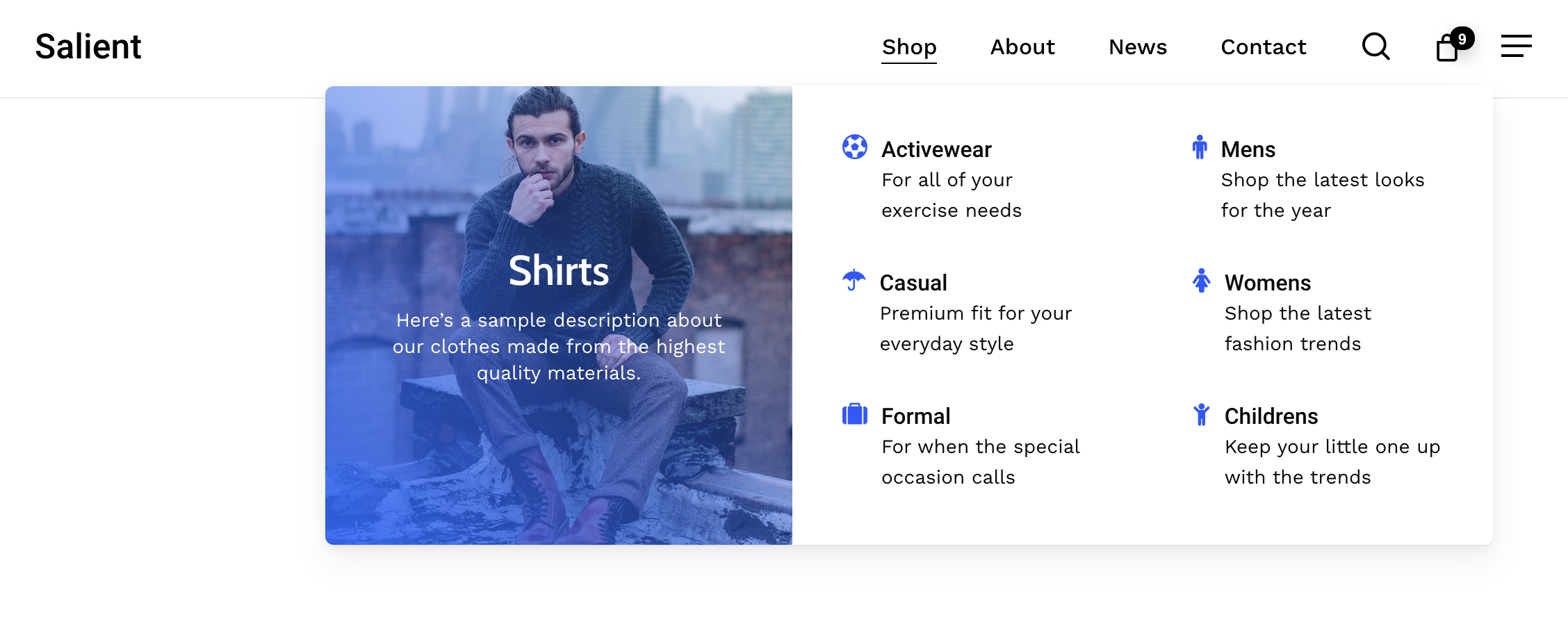
im trying to do a menu similar to this one: https://themenectar.com/docs/salient/wp-content/uploads/sites/35/2021/01/Screen-Shot-2021-01-30-at-7.14.14-PM.png
but the instructions here seem outdated and dont match up with what the content looks like: https://themenectar.com/docs/salient/salient-menu-options/
is there a quicker way to add it to: https://sfguide.co
Hey brianfreeman,
The documentation you linked is still the correct way to create that example megamenu. There’s also a video tutorial at the bottom. If you prefer to use the page builder instead of letting WordPress handle the links, you can assign a Global Section to act as your megamenu: https://ibb.co/XrnPCBT2
Kind regards
the documentation is outdated and doesn’t work. on your page it says disable mega menu but on the actual website it says enable. also below it your document says 40 for width but on the actual website it says 100%, 2x or 3x.
also, on menu item there is no where to put a image. when you put an image on mega menu section it puts an image on the entire background of the menu not just the one little section https://ibb.co/wFtHxLYh https://ibb.co/cjJ26FYHey brianfreeman,
The options you see in the menu editor will change depending on how deeply a menu item is nested. For example, only top-level items can enable a mega menu, while second-level items gain options for setting their column width inside the mega menu.
The documentation states this behavior here:
https://themenectar.com/docs/salient/salient-menu-options/#:~:text=will%20change%20based%20on%20how%20deep%20a%20menu%20item%20is%20nestedRegarding:
“on your page it says disable mega menu but on the actual website it says enable.”
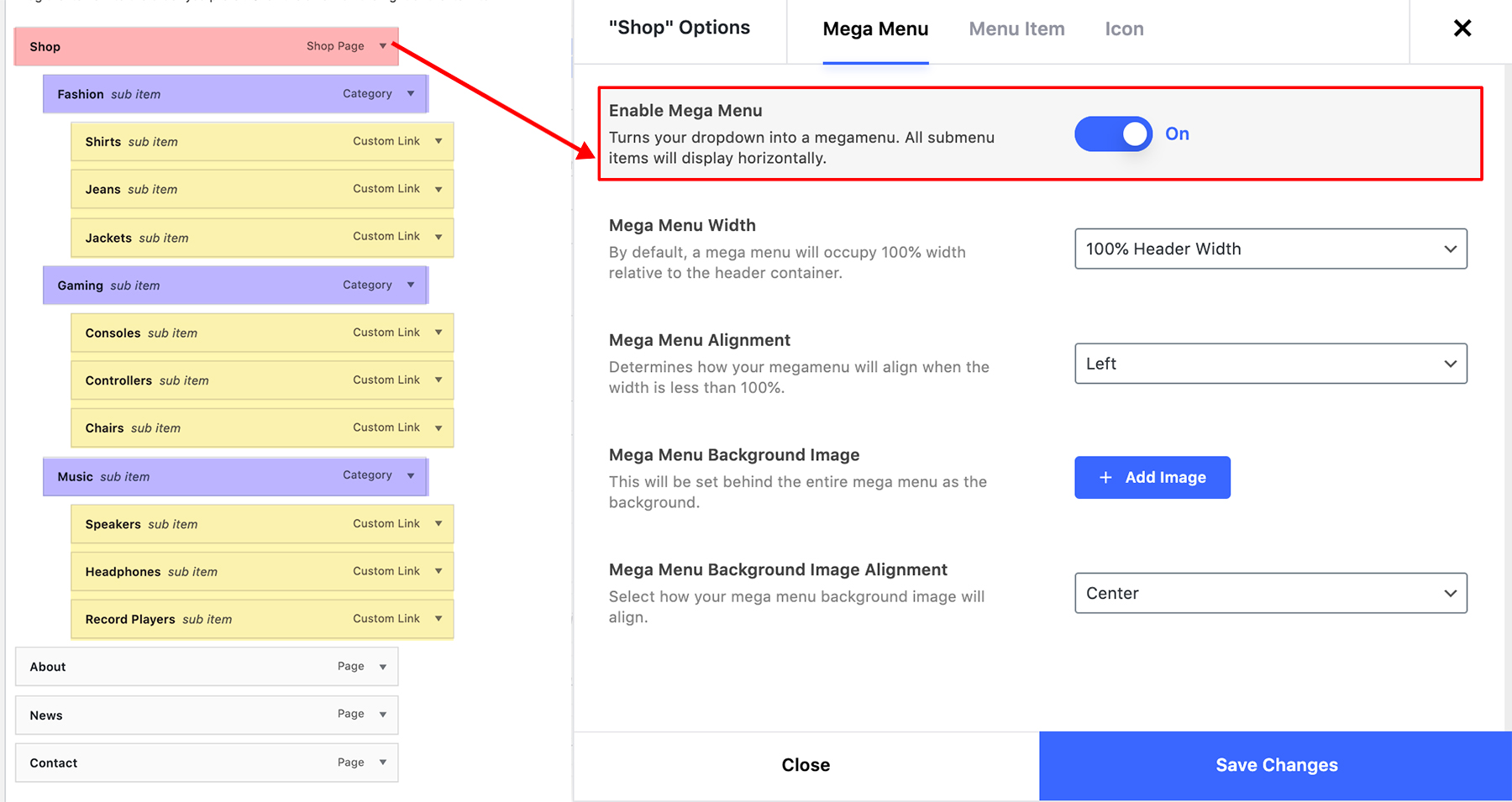
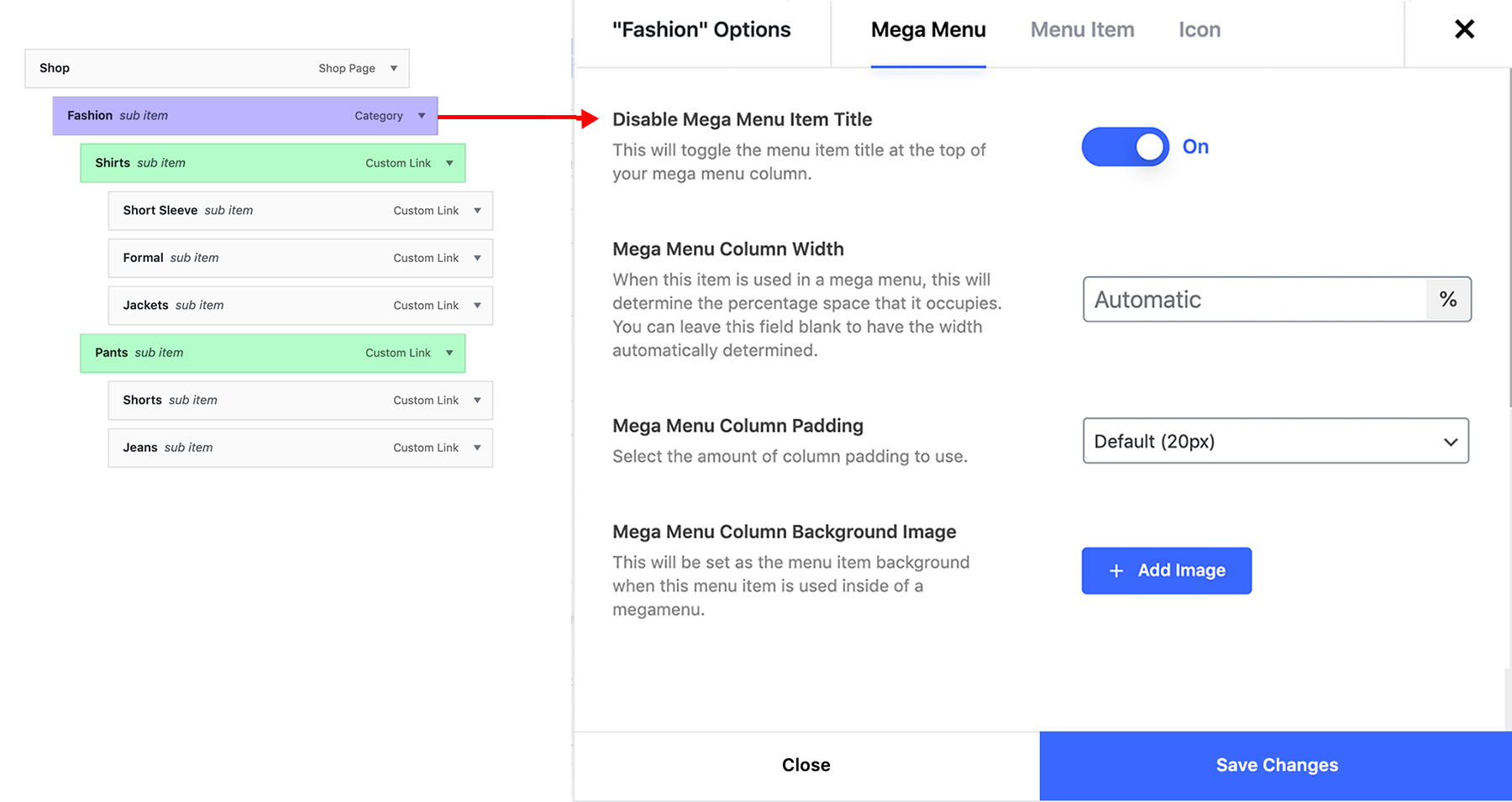
The “Enable Mega Menu” option appears only on top-level items, since that’s what turns the item into a mega menu. The “Disable Mega Menu Item Title” option appears on the direct child items of that mega menu. Both options are correct, they just show up at different levels. Looking at the documentation image here, the Shop item highlighted in red will contain the “Enable Mega Menu” option, and the Purple highlighted options (Fashion, Gaming, Music) will contain the option called “Disable Mega Menu Item Title” – as shown here.
“the document says 40 for width but the website says 100%, 2x, or 3x.”Those are two separate settings:
Mega Menu Width (100%, 2x, 3x) is for the parent mega menu and controls the overall size of the dropdown.
Mega Menu Column Width (percentage values) appears on the child items and controls the width of each column inside the mega menu (the purple items from the previous picture).
“there’s nowhere to put an image… the image shows as a full background instead of just in one section.”That means you’re likely editing the parent item. Only the child columns (the second-level items under the mega menu parent) include the “Menu Item Image” field for adding an image specific to that column.
The main thing to keep in mind is that each menu depth exposes a different set of options. Once the parent/child structure is set correctly, the available fields should match the documentation.
Kind regards
No “Border” tab for rows? Showing only for columns here.
Hey ex_br,
You can set a border on the inner Row element, but as of the current release we don’t provide an option to specify a border on the parent Row element. I’ve noted the idea on the wishlist 
Kind regards
Hi a quick question, when this carousel is used https://imgur.com/a/cFAurqy it has a slight fade-in animation, how can i disable that? There is no option
Hey toolbox101,
carouFredSel is a legacy carousel and not recommended to be used over the new options. The carousel requires JS initialization before displaying and the fade in can’t be removed with CSS, unfortunately.
Kind regards
Thanks. So what is more modern carousel that you recommend using as a replacement?
Also, a small feature request.
Would you please add a label to all legacy features so we know which is old and avoid using?
Or perhaps add a modular system that lets us turn off all or select legacy features? This i think would be great and will remove the bloat from the page builder and global settings.
Thanks
Hey toolbox101,
Flickity is the recommended Carousel script – there should be a note about this if you hover over the info icon next to the script option in the element.
Kind regards
Thanks
I have a list of accessibility issues that i’d like to brung to your attention.
Also several feature requests.
Should i drop them here or you have a dedicated form for a long list?
Thanks
Hey toolbox101,
The best place to make requests or report issues is on the support forum or directly through email. For email, you can use the contact form on this page.
Kind regards
Hi, I am sorry but today I checked your recommended Flickity, it too says deprecated when i hover over the i.
Hey toolbox101,
The info tooltip for the Carousel script should only mention Caroufredsel as the depreciated option regardless of which script selected: https://ibb.co/9mdQG1RB
The theme is really good and beautiful, and the support is great.
Feature sugestion:
We have the Edit, Clone and Copy buttons for the elements. Would be nice to have a Cut, or even better, a Send to Library button, which would remove the element and keep it in memory to be pasted elsewhere, or save directly to an accessible library to be inserted wherever it shall be needed.
Cheers.
Hey ex_br!
I’m glad that you’re enjoying Salient
You can already save single elements or sections into the Templates using the Native WPBakery template functionality.
Kind regards
May i ask something more. On woocommerce on category view, the images does not appear as a box. How i can have them to be 1:1 on apppearance/customize/woocommerce /product images thumbnail croppingis set to 1:1 but each category thumbnail has other image ratio. Thanks
Hey C_Drosos!
I can’t seem to replicate that locally. Could you kindly share the URL where I can take a look at the images?
Thanks in advance
Ok i found it. It was an auto select category for image plugin that was doing the problem. After i manually selected some images all good
Hey C_Drosos,
I’m glad that you were able to get it sorted
Kind regards
Hello,
I just noticed an issue with the menu button : when I hover over the menu button, it disappears. Simply moving the pointer over the button causes it to hide. Here is the code that I have in custom css for the current styling of the button.
https://pastebin.com/Xff4TX9bwebsite link – https://shorturl.at/06ga5
Could you please check what might be causing the hover state to make the button disappear, and advise on how to fix it?
Thanks
Hey asingh2404,
It looks like you have a custom rule targeting the hover effect
#top .slide-out-widget-area-toggle a span .lines-button.hover-effect {
    left: 0px;
    margin-top: -2px;
}
Setting a left to 0px on that will prevent it from showing. For assistance with custom CSS, please use the support forum in regards.
Thanks in advance
Hello! We have Shopkeeper theme for our Woocommerce shop. Is Salient recommended to use for a Woocommerce based shop? We have legacy checkout. Thank you in advance.
Hey Aggravated_Badger!
Yes, Salient supports WooCommerce. I would suggest taking a look at our WooCommerce demos:
https://themenectar.com/salient/ecommerce-robust/Kind regards
Hello,
I’ve purchased your theme many times and I love it! However, I’m having a problem with the Germanized plugin in WooCommerce. Unfortunately, the privacy policy checkbox isn’t displayed at checkout. Could it be that the plugin and theme are conflicting? I’ve activated everything in Germanized, and other checkboxes work fine. But this one doesn’t.
I would really appreciate any help, thank you! T.
Hey frausieben!
Are you using the newer WooCommerce block based checkout or the legacy shortcode based checkout? https://themenectar.com/docs/salient/using-legacy-woocommerce-cart-checkout/
If you could open a ticket on the support forum in regards, we would happy to take a closer look.
Thanks in advance
When the V18 will be released please ? Should came late in october and still nothing.
Hey technique-krealid,
We’ve only shared estimated timing for v18, as we do with all major releases. We try to avoid giving exact dates because beta testing and community feedback can shift things around. I appreciate your patience — and I know you’ve already opted into the beta program and received an early copy earlier this month.
Kind regards
May i ask something. On this demo themenectar.com/salient/portfolio-layered/ how i xan remove in the end the huge c 2025?i searched everywhere on footer settings its not there or on widgets
Hey C_Drosos!
That’s added via a Global Section. Here’s the docs on that feature: https://themenectar.com/docs/salient/page-builder-global-sections/
Kind regards
Hi, we encounter a bug on the v18 beta, when you use an image with custom max width in a global section set to footer location. A line appear in the html : ”.img-with-aniamtion-wrap[data-max-width=”custom”].center { text-align: center; }.”
The bad spelling word “aniamtion” can be the cause.
Hey technique-krealid, thanks for reporting.
That’ll be corrected in the official release.
Kind regards
3 licences so far. Cant wait to buy more soon
Hey C_Drosos, Thanks so much! We really appreciate your support.
Hey there. Quick help. My Off Canvas Menu is not showing on mobile. How can I fix this?
Hey kayota,
Do you have a menu assigned to the “Top Navigation” menu location or “Off Canvas Nav” locations? If so, please share your URL so that I can take a look.
Thanks in advance
Its assigned as Off Canvas: https://Curumari.com
Thanks kayota,
Can you confirm that you don’t have a CSS snippet active in the Salient options panel > General Settings > CSS/Script related tab which is hiding the mobile menu? Looking at the source, I’m seeing
#top .span_9 > .slide-out-widget-area-toggle {
  display: none!important;
}
Hello Team,
Is there any news about V18?
Thanks
Thank you for the wonderful template for Woo! We will soon be performing maintenance work on our website, and we are wondering if the next version of the template will be released (as per previous comments) this week? Or is it not feasible yet?
Hey art90, thanks for your kind words
The v18 release is officially coming early next week!
Cheers
Hi, do you have same design html template?
Hey arobilrbn, thanks for your interest! Salient is only available as a WordPress theme.
Kind regards
Hi. I’m experiencing the same noticeable issue in Chrome on your demo website – the header animation is lagging. Do you have any idea what might be causing this? It’s quite annoying.
Okay, I updated Chrome and the issue is gone. Weird!
Hey mediaroot! Let us know if you’re able to see it occur again.
Thanks in advance
Hi, any way that the search of the top bar, when you do a search only searches for the title of the post and not all the content like description inside tthat post?
Hey dimage,
That’s the default WP behavior and not something tied directly to Salient. However, you can use a plugin such as “Relevanssi” or “SearchWP” to modify how the internal WP search functions.
Kind regards
Thanks for the info
Hi, I have been using this theme for quite a while now and love it!
I have just run into a strange issue though and wondered if it was a known bug?
On the WP Bakery screen I now have an orange dot on the Page Settings Cog and it won’t now open the settings for editing. This makes it really difficult to edit the page now.
I have reinstalled the Salient Core and Salient Bakery plugins but still no difference. Everything else is up to date.
I have now run out of ideas on how I can try to fix it?
Hey damob!
That’s not a known issue. If you’re using the latest version and have disabled all third-party plugins to rule out a conflict, feel free to reach out via the contact form on my author page so we can follow up.
Thanks in advance