8685 comments found.

I’m currently having trouble with the theme options on a new site. Things like logo settings and menu layout work fine, but many of the other styling options do not work. I’ve changed font sizes, colors etc, but none of these changes are reflected on the front end. I’ve cleared the cache, and tried different browser but cannot get the theme options to work.
Hi jvwekken! Unfortunately, we cannot understand what is creating the problem for you but it can be a problem with the Max Input Vars or file permissions for the file responsible of the custom options. please share your site preview so it’s possible to check.
The working site is http://deluxurysinks.com/ – theme options are being saved in admin but are not reflected on the front end. I’ve tried file permission 644 and 755 for uncode/library/css/style-custom.css but no luck. Max input vars is set to 3000
For what I can see there is an error in the dynamic CSS but I never saw this so without debug I cannot say what is related: https://undsgn.d.pr/LuywwH
Try to remove this font completely maybe this helps!
Hello, someone asked this question a while back and wondered if I could have the code to disable the Xing.com and email social icon links from the portfolio share section.
“Original question – Where can I define which Social sharing platforms should be displayed in portfolio items? In the config of the theme I can see “Enable share” on ”Portfolio > Content” but I would like to hide some of those options (i.e. Pinterest, LinkedIn). Thanks”
Hi bluecubeantony! You just need to use this code (not tested but should work):
.social .social-xing{
display: none;
}
Anyway, if you need support is offered in our Help Center, there we have a completely dedicated support team, please submit a ticket so we can check your installation and support the solution privately! Thank you! https://support.undsgn.com/hc
Hi. im getting issues when I change the Font. As soon as I changed the Font… The Front end stops working… Nthing to do… I had to Delete WP and the Theme and re-install… Then everything worked fine… Till I changed the Font again… Again… The Front End stopped working… Why is this?
Hi genius514! Unfortunately, we don’t know why you have this issue, do you refer that the Frontend Editor stop working or the Frontend of the site? The only issue we can think of it’s related to the Heading animations effect that can create issue if the font it’s not properly installed.
Hi. How to download a font from Font Squirrel to Font Stacks? Fonts don’t appear in Font Imports.
Hi bmesquita! We are sorry but it seems that recently (we noted this the 19th of December) Font Squirrel service is not working anymore, their API service is currently not available, note the 500 server error: https://www.fontsquirrel.com/api/classifications
We tried to warn them about this but there was no response. If the problem will not be solved, by the next update we will remove Font Squirrel from Uncode.
At the moment, since their service is not working, the only method to use a Font Squirrel font is download the font and install manually: https://support.undsgn.com/hc/articles/214006085
Anyway, if you need support is offered in our Help Center, there we have a completely dedicated support team, please submit a ticket so we can check your installation and support the solution privately! Thank you! https://support.undsgn.com/hc
Thank you!
Hi bmesquita and thank you for the confirmation! 
Hi bmesquita! Just to notify that Font Squirrel is up again!
Great! Thank you!
I think they didn’t notice, this time they saw our messages!
Hello! I have just noticed an issue. When I am using Content Block for content under “Posts” in the Theme options section, the “post count” option for posts doesn’t work when set on “Dynamic Query”.
This is the 30th license I’ve gotten for this theme, and I love it. All help is greatly appreciated.
Regards, Stian Skjelbred – Norway.
Hi skjelbred and thank you for appreciate Uncode! 
If I understand you correctly this is the expected behavior. When you use the “Dynamic Query” all the options of the “Build Query” are not taken into account since you revert the query back to the native WordPress Query for that specific page. For example, if you use it in a category page you will see exactly the same you have with the basic WordPress theme. The only position when the Query number works is for the Related Posts, here you can use the “post count” to limit the number of related items. Let me know if this makes sense!
It does. Thanks.
It makes some issues for us tho. But some js magic will fix it  Thanks for answer.
Hi skjelbred and thank you for the confirmation! In what scenario you would like to use? Maybe we have some idea/trick…
Hi,
I have updated the theme to 2.2.6 for a customer of mine. I try to register the theme, but it does not save the Themeforest licence code. Is it possible to fix this?
Thank.
Regards,
Richard
Hi SocialPepper! No the registration works as expected in this version but since the registration occurs online there are some possible issue, please try to check this page and in case open a ticket so we can check: https://support.undsgn.com/hc/en-us/articles/115004287985
I do not have support anymore as the 6 months expired. And there is no error message in the dashboard. Also all requirements are met. Problem is that I cannot update my required plugins now…
Hello,
from here it seems you still have support enabled so I highly recommend to contact our help center and allow us to take a look at your site backend. Meanwhile, you can update everything since all the plugins are included in the main zip file you downloaded from ThemeForest. More info here: https://support.undsgn.com/hc/en-us/articles/213454589-Plugin-Installations at `Install plugins via WordPress or via FTP` section.
Also: check if you have red message in your browser console when you try to register the theme. Maybe your server doesn’t allow to communicate with Envato API or something like that.
Let us know, best
Hi, Thanks for your quick reply. It is a different website, but I understand what you mean. And updating via FTP is indeed an option. I did not think about that. Thank you!
Regards,
Richard
Hi SocialPepper and thank you for the confirmation! In case we can update on our Help Center.
Hi, today I find something new for me… Fronted editor… it would be so nice but it doesn’t work… https://i.postimg.cc/PfWjYtyR/11.jpg
I purged cache in cloudflare, litespeed plugin, updated all in wordpress and still only loading, loading… Is it arguing with any of my plugins?
Hi adrianmirgos! Pretty sure it’s Rocket Loader from Cloudflare, otherwise we need to access the website to debug since we don’t have other similar reports.
You were right! Frontend editor works perfectly now, but website loading speed slowed down a lot … after making changes need to turn on the Rocket Loader again. It’s a bit of a pain but it’s not a big deal. Thanks
Hi adrianmirgos and thank you for the confirmation! Sincerely I’m not sure why this extension is triggered also in the admin of the website, it should work for not logged users only.
I found another problem.
I made an update today a few versions forward and one option does not work … I can’t change the proportion of photos in the “media gallery” – it used to be loaded for a long time when there were several dozen photos in the gallery, but now it doesn’t load at all in such galleries. Where there are several photos, it turns on quickly but if gallery have dozens photos it doesn’t load…And I can’t place vertical and horizontal photos side by side in the new gallery 
Hi adrianmirgos! This works like a charm also in the last update. This can be related to a Memory issue or a problem with some plugin you have, since you have this problem with lot of photos, probably this is a Memory limit issue from the server.
now working ?
how can i disable the bg image on mobile ?
Hi daneshgah! I really don’t understand this message? The documentation you sent us is for Avada, do you need the same for Uncode? In case use this:
@media only screen and ( max-width: 559px ) {
.background-inner {
background-image: none !important;
}
}
Anyway, if you need support is offered in our Help Center, there we have a completely dedicated support team, please submit a ticket so we can check your installation and support the solution privately! Thank you! https://support.undsgn.com/hc
registration not working
I installed the latest version and can’t register the theme. If put the old version of uncode back in place, there is no problem registering it. With version 2.2.6 I add the product code, click submit…and nothing happens. No error. No registration. Can’t modify the theme.
frustrating
Because I need to finish the updates on this site before my client’s workday begins again tomorrow morning, I purchased another license, thinking the issue was a problem with the old license. The new registration code doesn’t work either. Please do something ASAP so I can use the licenses I have paid for.
Hi iHuman! In fact the problem is not of the theme, but the registration occurs online, this means several factor are involved. Please follow this page here you can find all the possible causes, if nothing happens probably you have some browser extensions that block the connections in your browser, or you have some Server Requirements not confirming: https://support.undsgn.com/hc/en-us/articles/115004287985
Anyway, if you need support is offered in our Help Center, there we have a completely dedicated support team, please submit a ticket so we can check your installation and support the solution privately! Thank you! https://support.undsgn.com/hc
Hi – I have my Block Layout set to “show content under image”. However, I’m looking to have either an icon or custom text on the image overlay mouse over in addition to this. Is that possible? I have chosen an icon in the block settings but it doesn’t show on the overlay. Thanks in advance.
Hi GastricApple! You need also to select the Icon element in the Element list: https://undsgn.d.pr/aMu2tr
Anyway, if you need support is offered in our Help Center, there we have a completely dedicated support team, please submit a ticket so we can check your installation and support the solution privately! Thank you! https://support.undsgn.com/hc
Hi, got that fixed thanks!
Just one more question – I’m looking to make the categories in my portfolio elements bordered, not clickable and change the color. Is this possible?
I have them bordered but can’t see any option to remove the link and change color. Thanks in advance.
Hi GastricApple and thank you for the confirmation!
Not easy to understand just in words, anyway the problem is that the categories are clickable now? In case please try to remove this option: https://undsgn.d.pr/t8t5C7
Hi guys, got it sorted thanks! Have come across something else though. How do I center the dividers? I’ve reduced the size to 50% but it left-align, can’t see any options for alignment. I want it centered. Thanks!
Anyway, if you need support is offered in our Help Center, there we have a completely dedicated support team, please submit a ticket so we can check your installation and support the solution privately! Thank you! https://support.undsgn.com/hc
Thanks for this. I’m in ‘Post Settings’ but don’t see the option in your image to ‘remove clickable areas’?
The category of the portfolio item shows, but I don’t want it to be a clickable link. Thanks for the help!
Hi GastricApple! In the Block tab of the Posts module, if you are using the Overlay layout, there is an option “Multiple Click Areas” set to No. Otherwise, please share your site preview so we can understand the settings or open a private ticket. Thanks!
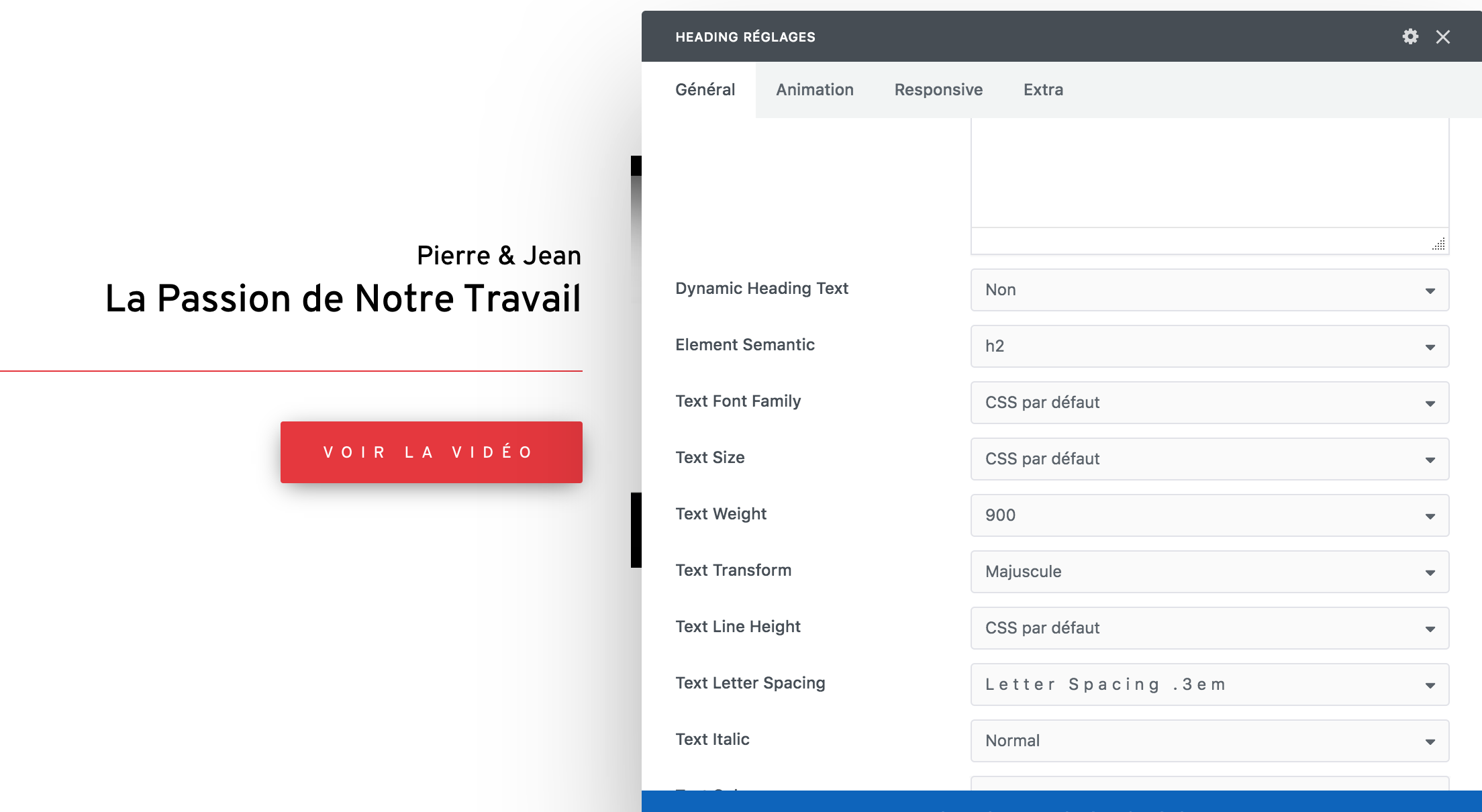
Hi! Since I updated the theme, the heading settings are not taken into account anymore (like the “Texte Transform” or the “Text Letter Spacing” for example). How can I fix this please?
Hi kry_jvt! This is not a problem related to the update, tested now with the last version and everything works fine as expected. In fact if there is a problem like this, here you’d find thousands of users reporting the same problem but it’s not the case. Anyway, please share your site preview and upload some screenshots of the options so we can try to understand what is creating the problem in your installation.
Ok thank you for your help! The site is https://www.pierreetjean.ch/ and here are the screenshots: - https://www.pierreetjean.ch/wp-content/uploads/2020/01/Screen-Shot-2020-01-05-at-15.50.47.png —> you see here that the text should be in capital (“majuscule”) and the letter spacing you be .3em and it doesn’t translate on the text. - https://www.pierreetjean.ch/wp-admin/upload.php?item=76120 —> here you see that if I activate the dynamic heading, the settings are applying correctly but I don’t want the text to be the title.. Thank you so much, let me know if you need anything else.
Hi, inside all your Headings you have codes, the options cannot work if you have inserted codes in the Headings and this is not update related: https://undsgn.d.pr/hEWKGb
Please check the info here (this work this way from Uncode 1.0): https://support.undsgn.com/hc/en-us/articles/214006285
Ok ok, thanks a lot for the investigation. It is just super confusing because it worked fine before the update, I did not change anything in those headings and since I updated the theme, the all come out the wrong way, that is why the update was my only guess. But you are definitely right, just fixed the problem! Thank you so so much
Hi kry_jvt and thank you for the confirmation!
Anchors offset to work with sticky menu Hi! How to make sure that the anchors are correctly visible when working with a sticky menu? It seems that it is possible to set up an offset. But how ? Will this solution have an impact on the mobile version? Do I have to make different settings for a desktop version and the mobile version?
Hi secou! I’m sorry but I really don’t understand the request, for example this demo is using the sticky menu and everything is fine with offsets: https://undsgn.com/uncode/homepages/creative-artist/
Can you please share your site preview so we can understand the possible issue you refer?
Anyway, if you need support is offered in our Help Center, there we have a completely dedicated support team, please submit a ticket so we can check your installation and support the solution privately! Thank you! https://support.undsgn.com/hc
OK, let’s try to be more precise. I’ve build a one page site with a sticky menu. Then for each section’s title, I’ve put an anchor on it. Well… when I click on a menu item, the sticky menu hides the section’s title. So the question is: how to make the section’s title appears below the sticky menu?
Hi secou! You have not to insert the classic anchor, please follow instruction here: https://support.undsgn.com/hc/en-us/articles/214006065
If you check the example we sent you can see that the menu is sticky but any section perfectly scroll to the section: https://undsgn.com/uncode/homepages/creative-artist/
Works great! Thanks!
Works great! Thanks!
Thank you for the confirmation!
When I activate WPBakery Page Builder (Visual Composer) the website shows server hangup
WPBakery Page Builder 6.1
It is causing a serious issue on my website. Please help
Hi! This is pretty odd since this is the main Page Builder plugin and it’s used by all Uncode users without problems (otherwise here you should see thousand of similar report). Are you compliant with the Server Requirements? Do you have red errors in the System Status? https://support.undsgn.com/hc/en-us/articles/214000785-System-Status
Anyway, if you need support is offered in our Help Center, there we have a completely dedicated support team, please submit a ticket so we can check your installation and support the solution privately! Thank you! https://support.undsgn.com/hc
I have raised a ticket in your support desk
Hi santhoshsanthu and thank you for confirming, if you opened a ticket one of our agents will be back shortly.
Hello! I want to ask if I purchase the uncode theme now and there is a theme update in future will I suppose to buy something again or no?
Hi KalinaRuseva and thank you for interest!
No when you buy a theme on ThemeForest you have a lifetime license for the theme, this means that you’ll have all future updates included.
Hello sir I liked your template very much I have a site in Arabic and English Can I use the template in Arabic without ever having any problems? Please answer my question but good cooperation
Hello sir I liked your template very much I have a site in Arabic and English Can I use the template in Arabic without ever having any problems? Please answer my question but good cooperation
Hi iabuqaseam and thank you for interest!
Uncode is compatible with RTL languages too, confirmed!
Hi! uncode supports auto-load (infinite) scroll on posts? When scrolling and reaching near the end, auto load the next post (updating url too). Thanks!!
Hi AgenciaEgo! No it’s not possible to load another blog post inside a blog post, sorry. The only infinite-scroll available is in the posts module when working with index, this example uses infinite load button but it’s possible also on scroll: https://undsgn.com/uncode/blog/blog-boxed-masonry/
Thanks for your response. Do you know if any “Add Infinite Scroll Plugin” is supported by the theme? This feature is “a must” for the project.
Hi AgenciaEgo! I really don’t think you can use an infinite scroll plugin to load single blog posts consequentially. If I understand you need to load another article when the first is finished and I think don’t think that you can use in any theme unless the theme is designed with this feature by the authors, sorry.
thks for your response and your time! i’ll continue researching about this feature.
Thank you for the confirmation even if we cannot help with this!
Is it possible to change where the taxonomy comes from when you use one of the portfolio themes?
Hi kebo1625! I’m sorry but we really don’t understand your request, what you mean with “change where the taxonomy comes from”?
Hello, after moving de website to another host/domain the Envato Purchase Code is not working anymore. I deactivate from the original and still doesn’t work on the new place. What can I do?
Hi Atto_Creative! Do you have some specific error message? In case please copy it here so we can understand the scenario and help.
Its says “According to the Envato License Terms, you have exceeded the maximum number of activations permitted for a single Purchase Code. Please purchase an additional license. More info”, do I need to buy a new one? I just want to move the website, not to make a new one.
Hi Atto_Creative! Next to the error, there are also instructions to follow, please send a message from this form and include your Purchase Code, if you have this error is because you have exceeded the limit (this means you registered also other installations, anyway we can check and help): https://themeforest.net/user/undsgn
Hello, after a recent WordPress update some of the images from the website have disappeared. These seem to be the ones that are inserted into the WP Bakery Rows (used as the headers). I can see the image that has been uploaded in the backend, but when you click to update the section removes the image. The theme has been updated too, which was first recommended. Could you please have a look into this: gotoevents.co.uk.
Anyway, if you need support is offered in our Help Center, there we have a completely dedicated support team, please submit a ticket so we can check your installation and support the solution (or at least ask for support with an account that bought our theme)! Thank you! https://support.undsgn.com/hc
Hello, after Bakery Page Builder last update I see a dotted border around image (Single Media Module). Is it changed something in settings somewhere? thanks.
Screen: https://prnt.sc/qihti7
Hello, I see it from your screenshot, but I don’t see it from the live site. Are you sure it doesn’t depend on something in your cache: https://undsgn.d.pr/k0saCG ?
Let me know, best
Hello, thanks for the replay. Yes, it was only on my Chrome page. I really dont know why. I deleted cache and reopened. Now it seems perfect. thanks
Hi and thank you for the confirmation!