8685 comments found.

Hi there, on my pages I have an empty space on the top of the page when I drag a header or an other element in. Seams like this is the header, I turned it off at the bottom of the page options but it doesn’t seem to work….
Hi que_pasa_graphics! If you need support is offered in our Help Center, there we have a completely dedicated support team, please submit a ticket so we can check your installation and support the solution privately! Or at least, ask with an account that bought the theme. Thank you! https://support.undsgn.com/hc
Has the support for Relevanssi in the latest couple of versions stopped? We’re seeing no results when Relevanssi is active (but Relevanssi is returning fine in Admin)
Let us know how it goes or if you need help to update it.
Hello, on post carousel with Overflow Visible I want to show only posts on the right side and to hide the posts on the left
Hi HamdiBouafoura! We are sorry but there is not a code to make only a side of the overflow to hide the elements. The only solution is to “hide” the elements with a column with background and a bigger z-index, ex: https://undsgn.d.pr/PKYx44
Hi! My social media icons aren’t showing on the mobile menu but they are showing in the desktop and ipad version. I have the overlay menu option. No custom CSS interfering. Is this correct?
I’ve tried working around it ny adding them manually in the menu. I’m using the social media shortcode in a custom link with # on the link, but there’s nothing there. Another idea I have is to add the short code in the menu php file, but there’s so many of them so I have no idea what file to target.
My support are expired so I’m hoping you might point me in the right direction, none could help me in the uncode theme facebook group since this is such a theme-specific question. I’m unable to renew support for now.
Hi kamis! Without a link to your site, it’s really hard to tell what’s going on. In a nutshell you would like to have a similar result? https://undsgn.com/uncode/homepages/portfolio-agency/
Thanks for your quick response. Yes! Excactly like that. (Though I’ve made a text instead of links above). My site is kamis.se
Hi kamis! At the time of writing we are even not able to see the menu, probably for a Skins issue: https://undsgn.d.pr/y2602F
Hi! Yes, I hade it like that for a brief moment while I was looking for a solution, but it should be normal now (and I’m not touching any more settings!)
Hi, we are sorry but nothing changes, please deactivate Autoptimize plugin and clear the cache while we are checking your website…
Moreover can you please send us a screenshot of how you created this menu in the admin (“though I’ve made a text instead of links above”)? ...
Alright, thanks. I’ve cleared the cache and deactivated the plugins. The screen is below, but I can tell you it’s an ugly solution. The text is basically just a custom link where I added a paragraph in the navigation label, then I created its own css class and styled it so it looks like a regular, unclickable, text.
http://media1.kamis.se/2022/10/F3558679-273E-476A-B406-3227B31BAAE0.pngHi, we still don’t understand how you created this (and why you don’t used the Uncode Socials), anyway this code should fix:
li.menu-item-link.social-icon.tablet-hidden.mobile-hidden.social-120648, li.menu-item-link.social-icon.tablet-hidden.mobile-hidden.social-149499, li.menu-item-link.social-icon.tablet-hidden.mobile-hidden.social-149523 {
        display: inline-block !important;
        margin: 0 9px;
}
ul.menu-smart.sm.sm-vertical.menu-smart-social {
    text-align: center;
}
Yees! Thank you so much. You are the best!
(I’m actually using the socials in themeoptions/utilities, and now I can see them on the mobile too, so you fixed everything)
Thank you for the confirmation!
Hey Uncode,
Does your theme have the ability to have diagonal lines between columns? I know we can add them to the top + bottom of the row but my client is requesting something like this… is it possible?
https://cloud.metalpotato.com/YwnlwGHi MetalPotatoUK! No we don’t have this, in fact we never show in none of our demos. I’m not sure if you can create something similar with the a Shape Divider with an exaggerated height: https://support.undsgn.com/hc/en-us/articles/360000564625
I purchased two licenses a while ago for two sites. I deregistered the licenses on both sites, but when I tried to use them again, only one worked. The other one says it has exceeded the max number of activations. How I can get this cleared up without paying for 6 more months of support?
Hi and sorry for the delay during the weekend! As suggested by the instruction next to the error message you have, please send a private message using the form you find on this page, and include your Purchase Codes: https://themeforest.net/user/undsgn
Thank you!
Thank you for the confirmation, we already replied to you!
Hello, For the new top bar to work the navigation cannot be overlay/fullscreen? Thank you
Hi Maxim1985! We are sorry but ss for documentation this is only available for the Horizontal Menus: https://support.undsgn.com/hc/en-us/articles/8589240024081
Hi,
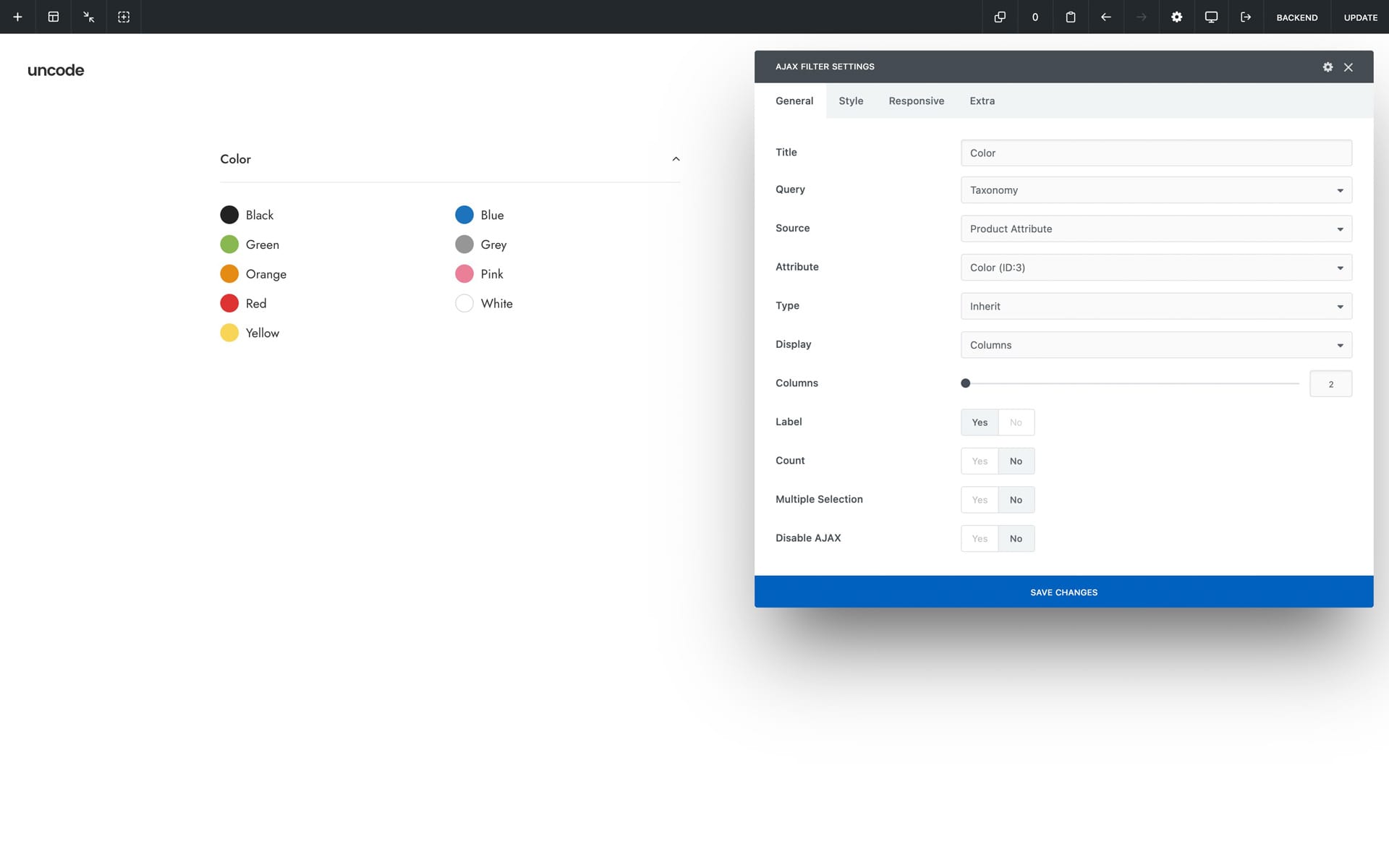
The new ajax filters feature is very helpful. I was waiting for this for months and it’s finally there. Thx!
I have just one issue, I’m trying to get an ajax filter colors same as on your template with color bullets corresponding to the color : https://undsgn.com/uncode/shops/shop-ajax-filters/?filter_color=black&unfilter=1But on my site, the color stays in a list…
Do i have to define the colors somewhere? I did follow the documentation here : https://support.undsgn.com/hc/article_attachments/8584011463825/doc-ajax-filters-widget-colors.jpg
Regards, Xavier
Hi mendakx! Ifif you need support is offered in our Help Center, there we have a completely dedicated support team, please submit a ticket so we can check your installation and support the solution privately (or at least ask for support with an account that bought the theme): https://support.undsgn.com/hc
From here we can only suggest to check all the documentation, and not only the step that involves the module: https://support.undsgn.com/hc/en-us/articles/8559436497809#&gid=1&pid=1
ok thanks, I actually bought the theme for a client used on the following site : https://kahuhome.com/
I’ll ask for the client to send the question from his account.
Hi mendakx! If you followed the doc and this doesn’t help please as your client to open a private ticket so Support Team can access and understand the problem, from here it’s not possible to understand what is missing (you can also notify here the ticket ID when opened): https://support.undsgn.com/hc
Hello!
I just migrate my site server, with the same domain. However I changed the website name, and there’s some error linked to uncode core.
Warning: file_exists(): open_basedir restriction in effect. File(/home/exacoat/webapps/exacoat_test/wp-content/themes/exacoat-theme/dynamic.css) is not within the allowed path(s): (/home/exacoat/webapps/exacoat_v5:/var/lib/php/session:/tmp) in /home/exacoat/webapps/exacoat_v5/wp-content/plugins/uncode-core/includes/theme-options/includes/ot-functions.php on line 277
Any idea what should I do? I tried resaving the theme option, reinstalling the uncode core, but it doesn’t work.
Regards.
Hi shandysuta! Please note that the first error points to a file that is even not native to Uncode, so I think that something went wrong during the operations. Please check the first error message that triggers the other, it referenced a “dynamic.css” file of the “exacoat-theme”: /home/exacoat/webapps/exacoat_test/wp-content/themes/exacoat-theme/dynamic.css
Moreover, the suggests a problem with server permissions: https://stackoverflow.com/questions/1846882/open-basedir-restriction-in-effect-file-is-not-within-the-allowed-paths
Thank you for your answer, I have contacted my hosting about this, however they said it’s because of the theme.
So this directory: /home/exacoat/webapps/exacoat_test/wp-content/themes/exacoat-theme/dynamic.css
Is not exist at all, the exacoat_test doesn’t exist (it’s the previous server), and exacoat-theme is actually uncode-child that I renamed.
I am wondering why the ot-functions.php line 277 which is: if ( ’’ != $path && file_exists( $path ) ) { Is calling a previous server directory for the dynamic.css (webapps/exacoat_test)
Deactivating the uncode core make the problem disappear.
What do you think? Thank you in advance.
I assume you already have a backup, but if not, make one: https://support.undsgn.com/hc/en-us/articles/360001216518-How-to-Backup.
In a migration it is always good to replace old paths in the database, I do not exclude that other problems may arise since the absolute paths have changed. In any case, this particular case should be solved like this:
- add this line to your child theme in the functions.php file:
update_option( 'ot_css_file_paths', array() ); - once you have loaded the file with the code suggested above, visit your site: you only need to load a page of your site to make execute the function included in the code.
- after loading any page you have to remove from your code the line I suggested above
- go to your Theme Options page and save them again, just click the Save button
Let me know if this explanation is clear and if this fixes the issue please, best 
It fixed the problem! Thank you so much for your support. Best theme and support i’ve ever bought out of 8+ themes.
While we’re at it, I also have something like this: Notice: Undefined index: width in /home/exacoat/webapps/exacoat_v5/wp-content/themes/uncode/partials/menus.php on line 277 Notice: Undefined index: height in /home/exacoat/webapps/exacoat_v5/wp-content/themes/uncode/partials/menus.php on line 277
What do you think is wrong?
Hello, glad that the first problem has been fixes. About the second one, it seems that 277 is a critical number for lines of code Joking aside, it seems to come from some problem with the size of the logo. What kind of logo do you have? An SVG? Can you share your site url so I can give you more guidance?
Let me know, best
LOL nice one. Yes, my site is using SVG for the logo, it’s https://exacoat.com
From here I don’t see anything strange unfortunately, can you zip and upload me somewhere the two logos you use so I can test them? Let me know.
Yes of course, here’s the zip for the svg logos! https://we.tl/t-L3KMxkmFDg
Hi shandysuta! We’ll be back to you later during the day after testing your logo in our installations, hopefully we can replicate the issue. ps: nice design at your website.
Hi! Can you replicate the issue?
Hi shandysuta! We’ll be back to you this morning.
Hi shandysuta! You’ll have to excuse us but your logo check was on the list but the link expired. Can you upload it again and send us the link so we can try it right away?
https://e1.pcloud.link/publink/show?code=XZKCt8ZxtkoGjT7vGHQY5VUKPAwRkA5RY6V
Also, I noticed other things related to SVG, if you see this page
https://exacoat.com/product/everything-skins-1, there’s a SVG ‘EVERYTHING SKINS (1)’ with the width of 800px, but instead of scaling the svg, it just cropped the svg. It was normal before.
Regards
Hi shandysuta!
1. With Logo everything is working as expected: https://undsgn.d.pr/eSajJz
The only suggestion is to declare a size here, ex: https://undsgn.d.pr/hzYzih
2. SVGs don’t work as images, here reference article ( in fact, if you open your SVG as a text file you can see that it has fixed measures https://undsgn.d.pr/u42oza ): https://css-tricks.com/scale-svg/
Hello again, this CSS snippet should solve your situation though, although I cannot guarantee that it applies to all cases:
.icon-media {
    max-width: 100%;
}
You can put it in your child theme, in Theme Options -> CSS & JS -> CSS or directly in page https://undsgn.d.pr/9vHeVX (if you do not want it to involve other pages)
I love you guys. It worked, and the solution given is really a solution. It’s rare to see something like this when telling a plugin/theme problem to the developer.
Thank you!
Thank you too for confirming (and for the kind words). All the best
Hi! Love your theme and using it on several sites!
Only one question: I built a scroll page with slides! Looks great on desktop screens with the very useful navigation points! But on mobile phones there is no navigation visible. Is it possible to integrate kind of sticky sandwich menu for small devices?
Here ist my page: https://www.drehbuchwerkstatt.de/relaunch/audiencefirst-storytelling-lab/
Thank you!
Hi stefanscheider, and thank you for appreciating Uncode!
Do you mean that you would like to have the dots also on mobile? In case you can try a code like this:
@media (max-width: 959px){
.onepage-pagination {
    display: block !important;
}
}
Or would you like to have a burger. menu visible only on mobile?
Fantastic and perfect! Works great – thank you!
In case of wanting a burger – do you have also a solution?
Hi stefanscheider, and thank you for the confirmation! No we don’t have a special solution, unless suggest to creare a normal menu, after this we can help with a CSS code to hide it on desktop so you have it visible only on mobile!
Ok, I prefer the navigation dots. The only thing now: The dots are showing up on my desktop in a small (mobile phone sized) window, where I tested your code – but still not on my “real” iphone! Do you have an idea, how to manage this? Thank you!
Hi stefanscheider! As suggested, “you can try” this code, unfortunately on mobile the dots are even not stamped on the page, my bad but there are so many functions that I can’t remember everything.
The only solution is to comment these codes in the file app.js: https://undsgn.d.pr/J6telN
Ok! Thank you for your great and fast support! I will have a closer look to the code! Still love your theme! 
Thank you for the confirmation! PS: Probably from an user POV the menu solution may be better, navigation dots are not so usable on devices (just my impression).
You are right! My workaround inspired by your last answer is now a small wp-menu on the first slide – that works for the moment! Again, thank you!
Hi stefanscheider! It’s more practical for the end-user! Good catch!
Hi there, really love the theme! I have one question for the top bar, is it possible to change te colours of the social icons? And I added html code (link to email address and phone number) in the theme options underneath the top bar. It has a blue line underneath it which would indicate that the link is working. But on the website it isn’t clickable. Also is it possible to change the color of the top bar? I did it in css for now, but is there an easier solution.
Hope to hear from you guys
Hello and thank you!
- The colour of the icons follows that of the text by default, but can easily override it with a CSS snippet.
- Links added with Rich Text Editor in the top bar work perfectly, at least with the latest version of Uncode.
- You can change the colour of the top bar, from “Theme Options -> Customise”.
Anyway, if you need support is offered in our Help Center, there we have a completely dedicated support team, please submit a ticket so we can check your installation and support the solution privately! Thank you! https://support.undsgn.com/hc
I updated the theme and now I am getting this error repeated a bunch of times at the top of my screen when I log into my WP dashboard. Can anyone help to resolve this?
onversion in /homepages/23/d271848070/htdocs/wp-content/plugins/uncode-core/includes/theme-options/assets/theme-mode/theme-options.php on line 1910
Hello elisalew!
Have you also updated the Uncode Core plugin to the latest version? In the current version of Uncode Core, there is practically nothing on line 1910 that would warrant an error, so I need to know for sure what version of Uncode Core you have. I also have the impression that the error message in your comment is missing a part, can you please check?
Let me know, best
Yes, everything is up to date. It started getting the error when I updated the plugin.
Thank you, however please also answer the other question: “I also have the impression that the error message in your comment is missing a part, can you please check?” It seems that the beginning of the message is missing, probably a notice or something, but without that information I don’t know how to help you, not to mention that that line of code simply corresponds to a description field of the section title ‘Navigation’ https://undsgn.d.pr/wvMiFM All section titles are the same in Theme Options and have the ‘desc’ field empty as in the screenshot.
Let me know. Best
Ah ok thank you. I cannot copy any more info than that because the code is cut off by the side of the dashboard and I cannot close it – I think the error in the plugin is causing that error I can send a picture if I have an address to email it to
Hello, do you mean this sidebar https://undsgn.d.pr/jDx8r5? If you mean that one you can collapse it and check again if you can see the entire message. However, with a triple click on the message text you should be able to select it entirely and copy it, even if not completely visible.
I’m not sure that a screenshot would be helpful in this case, however if you want to share an image you can use a tool like https://snipboard.io/ or similar that allows you to share images. Let me know, best
Sorry for the confusion. What I am saying is that there is no way to collapse the sidebar: https://snipboard.io/X65Zqy.jpg
Because the plugin is causing an error that won’t let me click on the sidebar at all. I hope that makes sense.
ok i was able to get the entire error:
Warning: Array to string conversion in /homepages/23/d271848070/htdocs/wp-content/plugins/uncode-core/includes/theme-options/assets/theme-mode/theme-options.php on line 3218Great, thank you. However, it is very strange. Without being able to enter the site I don’t really know what to advise, this is the first time we have had this problem, so if you can let us know what version of PHP you have on the server, I don’t know if it could depend on this.
Then, also try to disable all the other plugins please and check if the problem persists. If disabling all the other plugins (except Uncode Core of course) fixes the problem, activate them again, one by one, anche check which one of them is causing the conflict. Let me know.
If you can, disable and delete Uncode Core, so the system will ask you to install it again: maybe something went wrong in the unzipping of the plugin and repeating the operation can fix things.
Let me know.
Hi!
Is the slides scroll can’t be used on product page using content block?
Regards
Hi shandysuta! Slides Scroll cab be used everywhere but you need to take into account the requirements (Blank Page and Row Height 100%): https://support.undsgn.com/hc/en-us/articles/115005344505
Actually, I have done all the requirements but on the product page (which the uncode page options are available), there’s only a Simple Scroll option showing
Hello. We have disabled page scrolling by default in those types of posts where Page Builder is not normally used, and products are one of them. To activate it, you must add the filter in your child theme that makes the option available to you in the Page Options of the product (put it into the file functions.php of your child theme):
function uncode_child_fullpage_post_types( $post_types ){
    $post_types[] = 'product';
    return $post_types;
}
add_filter('uncode_fullpage_post_types', 'uncode_child_fullpage_post_types');
Also, add this slightly modified version of the single product content file to the child theme: https://www.dropbox.com/s/s5n2s0b0fkpemr0/content-single-product.php?dl=0 Add this file to wp-content/themes/uncode-child/woocommerce/content-single-product.php
Let us know, best
Does Uncode have the ability to have a “sticky sidebar”. So for example, if a user scrolls down the page, the contents of the sidebar sticks and does not scroll, meaning its content stays visible?
Hi MetalPotatoUK! You just need to activate the Column > Extra > Sticky option, ex: https://undsgn.com/uncode/shops/shop-sidebar/
You guys are amazing! Thank you
Thank you for the confirmation!
Hi, there.
I love this theme, I’ve been using it for years for my e-commerce. But right now I’m experiencing an issue with the search.
When I search for products, I’m seeing products that are out of stock (that were supposed to be hidden, since I have set this in the WooCommerce settings).
Also, when I search for a term, I’m not able to proceed to the next page. I get stuck in page 1.
Here is an example: https://bit.ly/3xNujRj – when you tap pages 3, 4, 5, any number, it shows the same products from the page 1.
I tried deactivating all the plugins and the problem persisted. I tried changing to another theme and the search page functioned as expected. No products out of stock appeared and I was able to proceed to the next pages.
Apparently, is a problem with the Uncode theme.
Could you please help me? Thank you very much.
Hi luizagarofalo, and thank you for appreciating Uncode!
1. For what regards to he search I have to ask the developers to replicate it because apparently, I don’t get the same result.
2. For the results, have you enabled Dynamic Query? https://support.undsgn.com/hc/en-us/articles/213459549#&gid=1&pid=7
On mobile, on the Shop page Products, you have to tap twice to open the product page. Is there a setting to allow you to tap once?
Hi SocialPatterns! Please try to use this option: https://undsgn.d.pr/hT7BtV
Anyway, if you need support is offered in our Help Center, there we have a completely dedicated support team, please submit a ticket so we can check your installation and support the solution privately! Thank you! https://support.undsgn.com/hc
Thank you!
Hi SocialPatterns, and thank you for the confirmation!
Hello! I’m trying to add new colors to the palette and I get the following error: https://smartsafety.com.ar/3s/wp-content/uploads/2022/09/Screen-Shot-2022-09-22-at- 11.13.27.png
Theme Options not saved. [403] Error 403: Forbidden resource can’t be accessed
Hi luciamyv! It seems that for some reasons we cannot debug from here it’s not possible to save Theme Options on your installation, please find here a dedicated article that can guide you to the debug: https://support.undsgn.com/hc/en-us/articles/115000580429
Thanks!
Thank you for the confirmation, hope you can find the culprit!
I can’t figure out what resource i’m missing. The php version is 7.4.30 https://smartsafety.com.ar/3s/wp-content/uploads/2022/09/Screen-Shot-2022-09-22-at-12.01.19.png. The url i’m working on is https://smartsafety.com.ar/3s/ Can you help me find out where is the error? It only happens when adding colors, not other theme options changes.
Thank you very much!
Hi luciamyv! Sorry for not being clear but this is not something we can do here. If you need private help you need to open a ticket so developers can log in and check the problem: https://support.undsgn.com/hc/en-us
Otherwise, since there is a 403 error you should ask your host to debug it from you and give more advice since they see the error logs.
oh ok, thanks
You welcome!
I am trying to set up variation swatches in single product and I am getting this error in my dev tools.
https://ibb.co/TWvNHR8The swatch seems to work with thumbnails showing correctly but when I am choosing different color the variation images don’t show and there is a infinite loading present.
Anyone else that tried to implement image swatches has the same problem?
Hi elcorso! No we are sorry but we don’t have any similar reports, and it’s really not possible to understand from this small screenshot.
Hi, is it possible to reset a single page template without re-installing the whole theme and losing all data?
Hi hejtecio! Not sure to understand the scenario but if you delete completely the page in questions (insert in the Trash and then delete it) or you rename it, you can install it again by the Selective Import: https://support.undsgn.com/hc/en-us/articles/214001065
Hi If i purchased this theme and i am unable to import demo content can theme support will do it on my site. i will provide admin credentials of my site.
I am asking this due to i am facing same issue on other theme that i have purchased but theme author is not responding to me so that i am planning to buy this theme
Kindly pls replay Thanks
Hi Aimtechnical! If you need support is offered in our Help Center, there we have a completely dedicated support team, please submit a ticket so we can check your installation and support the solution privately! Unfortunately there are few cases of users having problems with Demo Import, when this happens it is always related to server settings, so each case must be looked at and there is no common rule: https://support.undsgn.com/hc
can i get theme documentation pls
It’s online here: https://support.undsgn.com/hc
ok thanks for the replay Can i import demo theme as shown in live preview
If you need support is offered in our Help Center, there we have a completely dedicated support team, please submit a ticket so we can check your installation and support the solution privately! Thank you! https://support.undsgn.com/hc
i am planning to buy the theme so for that i confirming it with you
Please find here all the info: https://support.undsgn.com/hc/en-us/articles/214001065