8685 comments found.

Hi! I love love love this theme! Is there a prettier way to embed a Spotify podcast (the embed code provided by Spotify isn’t pretty)?
Hi birkmanit! Unfortunately, this is not possible with either Uncode or any other theme. The problem is that services like Spotify, YouTube, and others do not allow to change the look of their player precisely because this is distinctive to their brand (and after all, in a lot of these cases, they are offering a free service).
Good point. Thanks you!
Thank you too, all the best 
Hi, is there anyway to make the arrow on the galley carousel always visible and not only show when you hover over the gallery
Hi kawesabu! Please check this code, otherwise, we need to check your layout to create a possible hack:
.owl-next {
margin-right: 0px !important;
}
.owl-prev {
margin-left: 0px !important;
}
Works. Thank You
Thank you for the confirmation!
Hello, I wanted to update the theme, Wordpress told me to deactivate the purchase code and reenter again. Yet, once I deactivated and reenter, it said “According to the Envato License Terms, you have exceeded the maximum number of activations permitted for a single Purchase Code. Please purchase an additional license.”. Then when I wanted to submit a support ticket… it told me my support already expired and I could not able to contact the support regarding this issue in any possible way… How could I prevent the same issue happening again…? Thanks!
Hi haphoi2626! Is not possible? Next to the error you have precise instructions. Please send a private message using the form you find on this page, and include your Purchase Code: https://themeforest.net/user/undsgn
Hi there,
currently I cannot see that the post format typ link alters the appearance or behaviour of a post inside the post-module on my front page.
I would like to be able to post just a link that appears in the posts overview like other posts with content but redirects the user to another site on click. I am an experienced developer but I would like to know if there is any documentation regarding this module to extend that or if you have any other recommendations for implementing that.
Thanks in advance.
Hello gusi1994,
I’m not quite sure what you mean, but the “Single” tab within the “Posts” module allows you to set a custom link for each item: https://undsgn.d.pr/i/J13Wpb Perhaps you’re looking for this.
Anyway, if you need support is offered in our Help Center, there we have a completely dedicated support team, please submit a ticket so we can check your installation and support the solution privately! Thank you! https://support.undsgn.com/hc
I think I overcomplicated my question a bit. Is it a supported use case to extend the provided “Posts” module for the page builder? If yes, is there some documentation on this topic?
Hi gusi1994! No there is no documentation for developers, if that is what you are asking. There are many pages and video tutorials for the Posts module, but there is definitely no developer API. Besides I wouldn’t recommend to use the Posts module if you have to open links (because you would have “dead” pages used only for creating thumbnails), while it might be more opportune to use the Media Gallery where you can have a custom link for each item, a title and a description (the look can be quite similar to the Posts module). Here now we don’t know the details of what you need to do.
Thank you for your answer. This information is enough for now.
Thank you for the confirmation, even if we cannot always help with possible customisation issues.
Hello! Just simple question – how can I change line-height of text block? I can’t find it anywhere.
I know, that I can define line heights in “Theme options”, but don’t know how to use it (except for headings)
Thank you!
Hello! The line-height of the text block is the theme’s default and is hard-coded into the style sheet. If you want to change it, you can do so via the child theme or in “Theme Options -> CSS & JS -> CSS” with a CSS snippet:
p, li, dt, dd, dl, address, label, small, pre, code, span.tab-excerpt {
    line-height: 1.75;
}
This is the default value, change it as you wish.
If you want to target a single text module, add a class or id to your https://undsgn.d.pr/i/0JdjME module and use it for example like this:
.custom-line-height p {
    line-height: 2.5;
}
Anyway, if you need support is offered in our Help Center, there we have a completely dedicated support team, please submit a ticket so we can check your installation and support the solution privately! Thank you! https://support.undsgn.com/hc
Thank you!
Thank you for the confirmation!
For some reason, my main shop page, and when i set up links to shop categories, they are sometimes taking 45 seconds for those pages to load. The product pages themselves load in 2-3 seconds, however, the category pages, and main shop pages dont even begin to render for at least 40 seconds. Is there a reason thats happening?
My site is FuzedLabs.com – or FuzedLabs.com/shop to see the difference in load times from my main landing page, to the actual shop page.
Hi R3PL1K4N7! We are sorry but we are not able to reproduce the issue. When we inspect your website it just loads in a few seconds: https://lopezb.d.pr/v/wB0ZhD
From here it’s really not possible to debug better if we don’t have other users reporting this issue and we are not able to replicate.
If you need support is offered in our Help Center, there we have a completely dedicated support team, please submit a ticket so we can check your installation and support the solution privately! Thank you! https://support.undsgn.com/hc
Interesting, I encounter long load times still but only when i am clicking the category links or the main shop page. I have caching enabled, using an ecommerce plan. I guess I’ll reach out to support. I saw your video so I’m confused as my WP Engine host support said things were fast on their end too. hmmmm.
Hi R3PL1K4N7! At this point is probably a local problem if this works for us and for WPEngine support too. Really not sure how we can help more since we don’t see the problem…
Amazing theme!! Congrats. I would like to make a button that goes to portfolio not clickable. Just to have the roll-over image. Is that possible? Thank you in advance.
Hello Axi and thank you! However, I’m sorry, but I’m not sure to understand what you’re trying to achieve. If you can, please, provide an example.
Anyway, if you need support is offered in our Help Center, there we have a completely dedicated support team, please submit a ticket so we can check your installation and support the solution privately! Thank you! https://support.undsgn.com/hc
Hi Uncode Somehow between today and yesterday, all images on my website are suddenly blurred, unless I open the photos. Everything has been working without problems until now, and I haven’t changed anything. I updated all plugins, with no effect. Any solution suggestions? ( www.martinries.dk ) Best regards Martin
Hi Madebyries! If you’ve updated WordPress to version 6.4.x, you’ll also need to update Uncode, as Adaptive Images https://undsgn.d.pr/i/ZCaSSO won’t work with Uncode earlier than 2.8.7 and WP later than 6.4 (here’s the changelog https://support.undsgn.com/hc/en-us/articles/213454129-Change-Log and here more info about how to update https://support.undsgn.com/hc/en-us/articles/214001205-Theme-Update).
Anyway, if you need support is offered in our Help Center, there we have a completely dedicated support team, please submit a ticket so we can check your installation and support the solution privately! Thank you! https://support.undsgn.com/hc
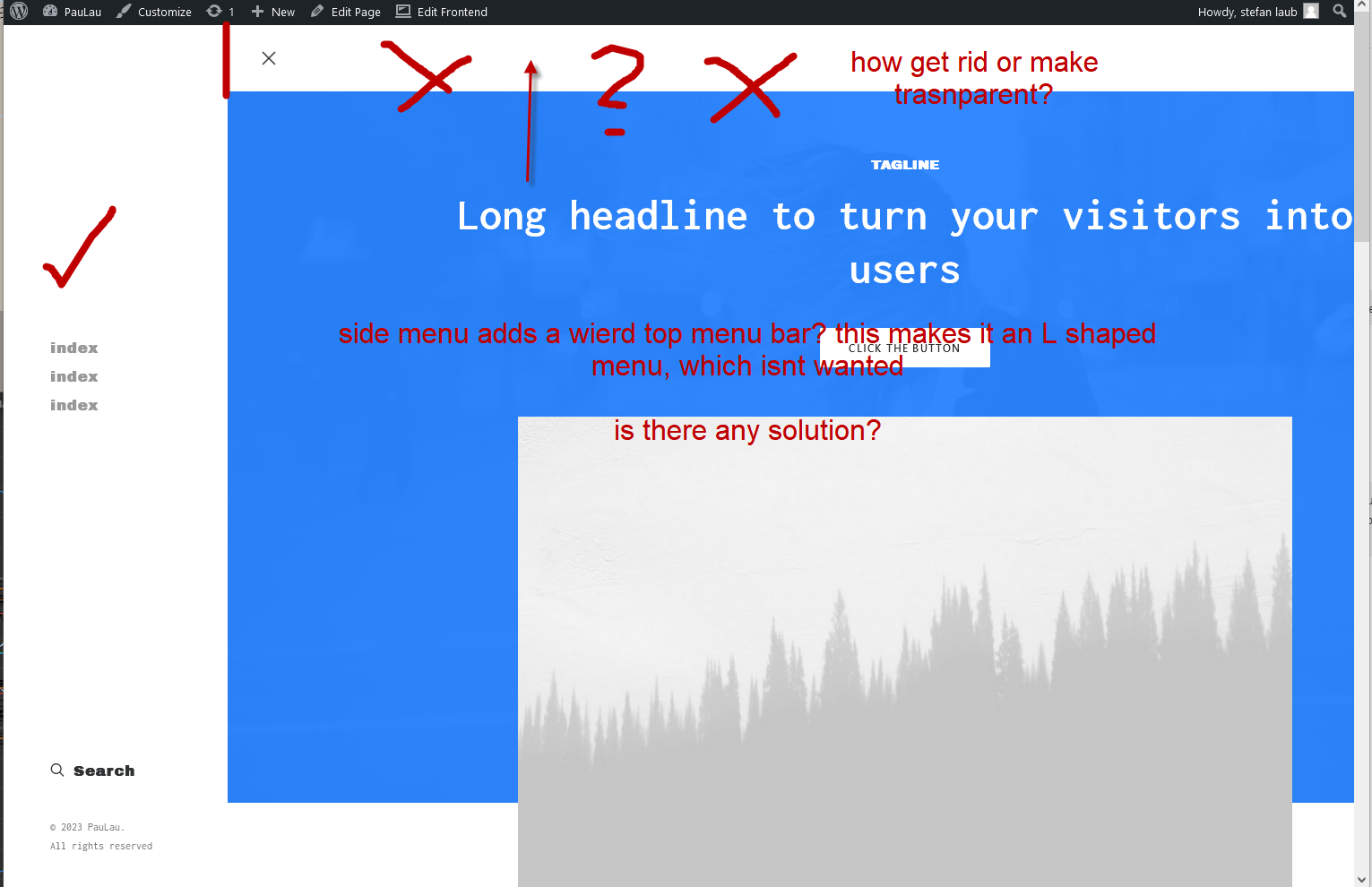
weird top menu added when i choose side menu, how get rid of it, or at least make it trasnparent? see here: http://stefanl.s3-eu-west-1.amazonaws.com/wierd%20top%20menu%20added%20when%20choose%20sidemenu.png does anybody know this?
Hi lllab! Ok we see now this message as told this messages board is terrible for support, the Off-Canvas Menu should work like this (again, we need you to access the Help Center so you can share the live link and logins): https://undsgn.com/uncode/homepages/creative-product/
is this a bad joke? do you read what i write? you block me from support so i cant use it…. also it cant be a side menu only works with top menu on? that cant be right?
We don’t block you. The login and emails that can access the Help Center are managed by Envato, this is a rule for all users. This prevents users who have not bought the theme (and thus their email is not recognized) from accessing the Help Center. Only the email linked to the Envato account can send messages. This is a general rule. We are not the ones who blocked your message but you must use the same email as your Envato account.
Hi lllab! Just to notify you that we are closing the office for the day. So if for some reason you can’t/won’t use the Help Center like everyone else, at this link you can ask for a refund since we need logins etc to help: https://themeforest.net/refund_requests/new
Alternatively, log in to the Help Center, navigate to your profile page and send responses from here. We will respond in the next few hours when we reopen the office.
we need help no refund but thanks. i managed now to use and find the support entry and try to use it via this from. i hope this will solve it. good evening then
We just replied to you (we need logins).
well i am not sure why i should give you login to my server? it is a clean new install, no plugins, no custom code. question is if that is normal, then for sure you know how to make clean, or if not normal, we wlil again clean install (was installed 3 days ago as testing site for the full once it works. so it is a clean fresh uncode code only.
Hi lllab! As told above in one of the message, FTP logins are only required if there is some possible server issue. We specified that for this we just need the live URL and the WP logins (you can also create temporary ones). Anyway, it seems we fixed everything yesterday on the private Help Center.
When we use sticky menu and scroll down, the menu three lines and logo are jumping on page, as you can see in video here https://www.veed.io/view/0bdacdc3-6988-4883-8fbd-db0218560989?panel=share, how can it be avoided?
thanks!
Hi lllab! It’s really the first time we see this, and it’s not possible to debug from a video, please deactivate all extra plugins, possible customisation, open a ticket and insert your logins so developers can check it: https://support.undsgn.com/hc
we solved the first one in removing a css to solve another issue, which is then the post above(also send to support but didnt get an answer yet. thx for help solving this issue. we want a normal sliding side menu not an L shaped menu.
Hi lllab! As suggested above if you need support please use the Help Center, we see that you replied but your message was blocked and you should have received a notification, please reply tickets with the same email used to login, otherwise the message is blocked. Also not sure what is L shaped Menu…
i didnt get any notification sadly. no idea why it was blocked?? i just added 2 images to explain our issue.
Hi lllab! As explained you replied our first message with a different email (not the one used to login to the Help Center), please check the spam since you should have a notification about the problem. Anyway, just reply your ticket with the correct email.
Hi, i see nothing in spam sadly, also the email in envato is an old that i cannot use for sending since years, all emails to this email get to another account with same domain ending from which i replied. Why is this so complicated? i am customer, you also see it here and i have purchased AND supported batch visible too. please for help! thanks!
for question what is l shaped menu see the link above for the screenshot i sent and posted here. for not understandable reason the side menu also adds a kind of top menu which forms an unwanted “L-shape” or top menu. we find no setting to remove this or make it invisible. as support not works via my recent email pls help me here or answer my “blocked email” please. thanks!
Hi lllab! Why is it complicated? There is a dedicated Help Center for support that is used by all the users. Simply, this message board is not followed by the Support Team and is not a support tool, in fact, you cannot send logins, etc…
Anyway, here is the message that was sent to you at 17:11: https://undsgn.d.pr/i/DlJ4fm
The email you used is not the one registered, and so the message was blocked. For your info you send the message using the “office@....” and not the “order@....” that is your valid email.
PS: Besides here you can’t even attach screenshots (precisely because it is not a support tool) and we really struggle to understand what is a menu “L shape Menu”, do you see the same on our site as well? In case send the link so we have a reference… On the Help Center you could have uploaded an image since it is not always easy to explain design in words. Just make sure you use the right email from your Envato account when responding to messages.
why complicated? as support blocks my recent email, and i cant answer with old. you see i am customer and hope for help and support. the new email has the same domain as old, so this really should not be a problem to verify i am a legal customer(i own 2 licenses). so i have no idea to get support as i cant use this old email saved here. i can only answer from new variant. (office@ instead of order@...)
“In case send the link so we have a reference” the link is in my post above! and you say i shall use the right email, HOW OFTEN DO I NEED TO SAY- THIS OLD EMAIL DOESNT EXIST ANYMORE, I CANT ANSWER FROM IT, ONLY RECIEVE IT (it gets send to new). it is weird i not et supported as my old email cant be used, you see i have 2 licenses, also support should see that,
We don’t know how to explain it. Help center access is managed by Envato, so you have to use the same Envato email that you used to open the ticket, if you don’t use the same email the message gets blocked. As mentioned, this message wall is not a support tool. You cannot use the “order@” email you used just a few hours ago?
PS: in your link above to Veed we don’t see any L shape, just a regular Overlay/Offcanvas Menu.
please help!
Read above, you cannot write in another message for a link you inserted into another message. Please use the Help Center as any user.
” You cannot use the “order@” email you used just a few hours ago?” i did never use it, i used the online form, you replied to my old email, the old email doesn’t exist since 10 years. i can receive emails to it as it gets transferred automatic to the new, i answer the support directly from same emeial where i recived it. this is the office…...PLEASE HELP, i cannot imagine Uncode cant do a clean side menu, for sure we do some wrong and needed your support
“PS: in your link above to Veed we don’t see any L shape, just a regular Overlay/Offcanvas Menu.” —>> well, there is a white bad(same colored bar as menu BG) on top. this is unwanted, i called it L shape but the name isnt important,the problem is how to remove the top white bar, or how to make it transparent to get a clean normal side menu,. thanks!
p.s.: the link in veed is not what i mean, the othe rpost with the image link: http://stefanl.s3-eu-west-1.amazonaws.com/wierd%20top%20menu%20added%20when%20choose%20sidemenu.png
i AGAIN get an email to use the “normal support as all others” well i tried but I CANT AS YOU BLOCK MY NEW EMAIL and ask me to use non existent old one!are you guys reading what i write?
Hi lllab! At this point it is a problem because “order@” is your Envato email.
You have to log in to our Help Center to write and read responses.
This is an Envato centralized system, and we cannot create exceptions as authors (we don’t have the tools).
How should I tell you that this does not happen on our demo, and so I certainly cannot tell from a screenshot why you have this? We need the live link and logins, so you need to use the Help Center.
Please login to our Help Center and use your account page to send and read messages: https://undsgn.d.pr/i/jMIiWW
Alternatively, ask for a refund because we cannot help you here (this is not our support tool). Of course, we use it but for simple answers to users with expired support and not for debugging.
Is there going to be a version released where controlling individual instances of the styles of buttons (i.e. button font size, font weight, better hover/inactive controls, etc.) – Currently, there are many options missing from a button style, even the styles in the general theme settings are missing things. But, overall, controlling a button with more options than what is available now.
Hi blakejnolan! No honestly nothing is planned for the next update, except for a couple of users we never got any requests regarding this element, so there won’t be any big changes. Certainly, in the Button module, you can change size, shape, font size, family, underline, etc etc… Now I don’t understand in detail your needs in case share some examples.
Anyway, if you need support is offered in our Help Center, there we have a completely dedicated support team, please submit a ticket so we can check your installation and support the solution privately! Thank you! https://support.undsgn.com/hc
Best Regards Lennart
Hi leppe! We are sorry for this issue. This is caused by a change in the new version of WP that broke the Adaptive Images. Anyway, Adaptive Images is an older version for delivering images to multiple devices; the newer option is the Dynamic Srcset:
https://support.undsgn.com/hc/en-us/articles/4403183673873
The newer Dynamic Srcset has been recommended and added since Uncode 2.4.0.
Anyway, a fix will be published later today or tomorrow, but we strongly suggest activating the better-performing Dynamic Srcset.
Thanks for a quick reply!! When I’m going to activate Dynamic Srcset this warning occurs;
Before using this option, it is recommended to delete the currently Adaptive Images to create the new Adaptive Srcset versions. Please click on ‘Delete all AI Images’ and then activate this option.
Does it mean that all images in Media will be deleted?
Hi leppe! Yes, exactly, but not your media, just the adaptive crops of these media
Thanks! Now that I have changed to Dynamic Srcset I see no difference. Will I do that when your fix will be published?
Please share the link, this fixed for all users so you are missing something…
From what I can see you don’t have the new option activated… your website is still using the Adaptive Images. You need to activate this option: https://support.undsgn.com/hc/en-us/articles/4403183673873#&gid=1&pid=1
My bad. Thanks for the help!
Thank you for the confirmation! 
Hi again! After updated the Uncode theme to the latest version, the blurry images occurs again, why
Best Regards Lennart
Hi, you have not flushed the cache or something else we cannot evaluate from here since the new version fixed this for all users (you just need to log into the Facebook group, for example, to have a direct comparison with other users).
Ok. Is it correct that both the “Adaptive Images” and “Adaptive Images Async” should be set to On?
Yes you can have to On both or better use this occasion to switch to the new and better performant Dynamic Srcset. Please follow this dedicated article: https://support.undsgn.com/hc/en-us/articles/14791390760989
Thanks!!
Thank you for the confirmation!
Hi, I am an Uncode enthusiast and use it often. I have a question: in the mobile version of a single post with left sidebar, I first see the sidebar and then the content of the article. Is it possible to reverse this order? I’d like to see the article first and then the sidebar at the bottom. Do I have to use a content block to do this? If this is the best solution, how do I manage the content of individual posts dynamically? I don’t need it for archive but right inside the article. Thank you
Hi pinkyvoice and thank you for appreciate Uncode!
Yes with a Content Block (custom design) you can use the option of the Row to invert the Column Ordering on Device (Responsive Tab), if you instead you are using the default layout probably it’s possible with a CSS but in case we need to check the website to suggest the correct code. So, if you need support is offered in our Help Center, there we have a completely dedicated support team, please submit a ticket so we can check your installation and support the solution privately! Thank you! https://support.undsgn.com/hc
Ok, I understand. I won’t bother you with a support ticket if it’s possible, only one question now: how can I set the content block to dinamically show the content of my post in a column?
Hello! Basically: you need to create a Content Block with the layout you prefer and insert a text module with the Dynamic Text option selected: https://undsgn.d.pr/i/VF5IA2 Then use this Content Block for the content of your post: https://undsgn.d.pr/i/VkcMq0
Again, if you need more detailed help, I would advise you to open a ticket in our Help Centre. Best
Great, thank you so much, it worked!
Thank you for the confirmation!
PS: Anyway, if you need support is offered in our Help Center, there we have a completely dedicated support team, please submit a ticket so we can check your installation and support the solution privately! Thank you! https://support.undsgn.com/hc
Hello, In the tab section in the excerpt, I want to add a line break or space between two texts. How can I achieve that? https://prnt.sc/_JdmCwFvGRK4
Hi Creativity_ns! We are sorry but this is not possible, this is a simple Excerpt text. There are no extra CSS we can suggest to help you here.
Hi! I’m trying to update a client’s uncode theme purchased by another developer. This other developer is not responding anymore. He basically quit and fled with pretty much everything he could. Would there be any way for me to retrieve the activation code associated with the domain to update the theme? Thank you for your time. I appreciate it.
Hi tobiedesgreniers300! No we are sorry but only the user that bought the theme has the License. Unfortunately, we cannot help with this because it may also be that he has used the licence for a new site. You have to contact the person who bought the licence or buy your own licence.
Hi, presale question: does it possible to add link and text (random) for the portfolio grid? Like this link the contact, blog etc… https://sekko.qodeinteractive.com
Hi kisarnold! You can have something similar, please note that on our demo, we have this setup only as an example of the blog (not portfolio, but it’s applicable as well): https://undsgn.com/uncode/blog/blog-media/page/2/
Hello,
I’m maintaining my wordpress website where there is Uncode installed. While I’m updating some plugins they say that there is a “There is an expected problem related to a possible website migration. Please remove the Purchase Code and register the product again from the System Status to validate the Purchase Code again.”.
Since it’s the first time in a year I’m doing updates my support period expired recently, what a timing!
Anyway, I have not installed the theme on multiple installations nor have done anything else.
I’m running my wordpress website in a AWS Lightsail distribution, so maybe there is a catch with DNS, HOSTINGS, IPs, Regions?
I’ve tried to unregister the theme from the settings panel, but then when I try to register it back with the code it says that it’s already registered somewhere else.. I don’t know what to do.
I can’t update the plugins, I can’t update the theme, I can’t update wordpress version.
Thank you.
Hi pasianottoengineering! Yes it seems you originally insstalled the theme on a different URL and you migrated to a new URL. Next to the error you have there are also instructions. Please send a private message using the form you find on this page, and include your Purchase Code: https://themeforest.net/user/undsgn
I can confirm that following your instructions the problem has been solved and now the theme is registered correctly.
Thank you.
Thank you for the confirmation!
domain change -> license
I purchased 2 licenses for Uncode. The domains they are registered are no longer in use. I need to have the licenses removed from those domains, so I can use them with other domains.
A suggestion…include a feature to release domains in your control panel. I have this option with other top themes I’ve purchased on ThemeForest. It would save both your team…and your end users lots of time!
Hi iHuman! According to the Envato License Terms, it’s not possible to use one of the Standard Licenses on multiple clients or jobs. In a nutshell, 1 license = 1 domain. Once that domain is no longer required, the License ends when that site is taken down: https://themeforest.net/licenses/standard
PS: We just want to add that if you have this feature on other themes it is only to allow migration from a staging site to the final domain (for no theme is it possible according to Envato Policy to use the same license for different projects). We also invited you to contact Envato if you think our directions are not correct.
Every theme I’ve ever purchased on Envato is 1 license = 1 domain. If you no longer are using it with that domain, you release the license and use it with a different domain. It can ONLY BE USED WITH ONE DOMAIN AT A TIME – but it is NOT permanently attached to a specific domain, I have read through the Envato Standard License and no where do I find what you are claiming – that when the domain is no longer required or the site is taken down, the license can’t be used on another domain.
I have also read on the community forums that the license can be transferred to a new domain.
You have implied that the there is a clause in the Envato Standard License that specifically says “ Once that domain is no longer required, the License ends when that site is taken down.” I do not find anything like this at all, so in case I missed it, please paste the exact clause in your reply to this message.
Hi iHuman! Here you are:
· Envato Standard License: https://themeforest.net/licenses/standard
· Full License Agreements: https://themeforest.net/licenses/terms/regular
Quoting the Standard License:
” You can’t use one of our Standard Licenses on multiple clients or jobs. ”
” You are licensed to use the Item to create one single End Product for yourself or for one client (a “single application”). ”
” For example: the item is a website theme and the end product is the final website customized with your content. ”
” One license for each customized end product “
You can also read this thread on the Envato forum where a Envato support representative responds: “If the website was the same and you were just moving domains for example, you could re-register the license. But a new website for a different purpose requires a new license.”
https://forums.envato.com/t/are-authors-allowed-to-reset-purchase-codes/454742If you think there are errors and inaccuracies in this, please contact Envato Support directly using the “Open a Support Request” button: https://help.market.envato.com/hc/en-us/articles/202821620-Contact-Us
PS: To speed up the process in the message of your request, you can ask to refer the tickets 3173336 and 3186674 (through these, you can be immediately directed to the right level of expertise, otherwise you may get a generic response from the first level support).
PHP bug since the last theme update. Fail to check that variable ’$media_post_id’ is set before using. Here is the error:
Undefined variable $media_post_id in /wp-content/themes/uncode/partials/elements.php on line 3247.
Please ensure the variable it set before using it. My logs are full of the above error (thousands of times).
Thanks
Thank you for bringing this to our attention, we will look into it immediately and, if necessary, come out with a fix in the next available update. All the best
Hi – this is still a problem after updating to the latest version (2.8.9.1). Only the line number of the error has changed:
Undefined variable $media_post_id in /wp-content/themes/uncode/partials/elements.php on line 3251.
On that line is a function call that uses this variable without checking that it’s set:
$picture_cover = uncode_get_picture_html( $media_post_id, .....)
Above it, lines 3211 – 3220 contain if blocks that attempt to set the variable. However, if none of the if blocks are true, the variable is not set.
It only takes one line of code to fix the error – I have done so by adding the following on line 3213 before the ‘if’ block:
$media_post_id = null;
Without this fix, it’s generating a huge number of errors in my logs. Please fix in the next release. Thanks
Thanks again for bringing this to our attention. A fix has already been included in the beta version. Best
Great – thanks v much!
You welcome
how to make top bar sticky?
Hello hernawan! Sorry, there is no option to make the topbar sticky together with the navbar. It could be simulated with custom CSS, but the navbar height is used for numerous calculations within the theme layout, and the topbar is not included in these calculations and this could lead to conflicts.
Anyway, if you need support is offered in our Help Center, there we have a completely dedicated support team, please submit a ticket so we can check your installation and support the solution privately! Thank you! https://support.undsgn.com/hc