8705 comments found.

Does this theme allow working with elementor?
Hello! Uncode is built on a customized version of WPBakery Page Builder. You can find more details here: https://undsgn.com/uncode/frontend-editor/ We have not tested Elementor with Uncode, and we do not provide support for it. Additionally, all our demos are specifically designed for WPBakery Page Builder. Best 
You have an automatic action in the recommended plugins that causes the server to overload both the CPU and memory even when no actions are being performed from admin/user side. Once you turn off the additional plugins like Uncode Privacy, WPbakery, Wireframes the problem does not recur anymore
See a picture of a 7-day tracking: https://i.imgur.com/Ht5urz9.png
Any explanations to this?
Hello! We have not received other reports about this issue, so we would need a bit more information to narrow down the problem. This would help us determine whether the issue lies within a specific script of the plugin or in how it was implemented (e.g., dynamic content looped in a certain way, excessive AJAX calls). Disabling WPBakery essentially stops the execution of all shortcodes, which might resolve any related issues, but it also disables advanced functionality. If you have an error report that correlates with the CPU data, we would be happy to review it.
Anyway, if you need support is offered in our Help Center, there we have a completely dedicated support team, please submit a ticket so we can check your installation and support the solution: https://support.undsgn.com/hc
A warning appears in the new update. After logging in to the site, the customer receives this message – Warning: Decrement on type null has no effect, this will change in the next major version of PHP in /…/wp-content/themes/uncode/core/inc/wp-bootstrap-navwalker.php on line 169
Hello, thank you for the heads-up. That file has remained unchanged for months, and that specific line has been the same for years. This suggests the issue might be related to updates in WordPress, a plugin, or a new PHP version. Do you have a child theme installed? Does the problem persist if you disable it? Could any particular plugin for the menu or WooCommerce customers be involved? We are currently working on replicating the problem and will investigate further to provide a solution as soon as possible.
Anyway, if you need support is offered in our Help Center, there we have a completely dedicated support team, please submit a ticket so we can check your installation and support the solution: https://support.undsgn.com/hc
this message appeared after changing php to a newer version. when I changed php to an older version, the message does not appear.
Thank you. And could you also let us know which PHP version you updated to, please? Better, if possible, providing both the older and the newer version would be greatly appreciated. TYIA, best
The error does not occur on php 8.1.28 and earlier. It occurs on php 8.2.19 and 8.3.7.
Thank you, we already have a fix, although it’s still in our beta branch. Since I can’t confirm when it will be officially released, I can provide the files and instructions for replacing them on your server if you prefer. Please replace the following files:
- wp-content/themes/uncode/core/inc/helpers.php
- wp-content/themes/uncode/core/inc/wp-bootstrap-navwalker.php
You can find the updated files here: https://www.dropbox.com/scl/fo/jhb0khjemn22seast2uv9/AOhp0QTi4mIM2tOr7gWE1TQ?rlkey=85wocwovlvomrmor4gnx4ij1l&dl=0
Let us know, best
Thank you very much. And a suggestion and a big request to you. Please integrate Uncode with the LMS plugin (Tutor LMS, Lernpress). Uncode is a great theme that has options that other themes do not have. Unfortunately, when connecting to Tutor LMS, the header, menu and logo are not displayed. Only the footer is displayed, but the one from the general settings for pages. The settings for courses, lessons, etc. do not work. Please, please integrate this and add in your marketing that the theme is compatible with LMS.
Hi adventurer51! In our Help Center I have seen several users who have created such sites, or I don’t remember the exact name of the plugin since there are several. To understand your specific problem we would need to see the details of the installation. Anyway, we take note of your suggestion for the 2025 road-maps.
I purchased the Uncode theme on April 11, 2023, at 05:28:07 UTC. However, when I tried to activate my license number recently, I encountered the following error:
“According to the Envato License Terms, you have exceeded the number of activations permitted for a single Purchase Code. Therefore, please purchase an additional license.”
I am unsure how this is possible, as I have already purchased the license and should be able to use it without any issues.
I have also sent an email regarding this matter but haven’t received a response yet. Could you please look into this issue and assist me in resolving it as soon as possible?
Hi Ronakpoddar00! We cannot determine what the issue might be from here, especially since this license dates back almost two years. Anyway, next to the error message you probably have, there is a ‘More Info’ link that takes you to a documentation page with all the information you need. If you haven’t seen it in a nutshell, please send a private message using the form you find on this page and include your Purchase Code: https://themeforest.net/user/undsgn
I bought it on November 9, 2024 in Korean time I received an email that the license support expiration date is May 11, 2025. However, it is not confirmed on the list in themforest. So I can’t ask personal questions with the ticket. Can you contact me by e-mail at bydme26@gmail.com ? I’ll show you proof that I bought it
Hi bydme! Unfortunately, we cannot provide further information on this because the entire process of purchase, license, and renewal is managed by Envato. The login to our Help Center is linked to Envato’s systems, and if this purchase does not appear in their records, it is very likely that you cannot access our Help Center. We therefore recommend contacting Envato to clarify the issue, as it seems to lie within their systems. Once this is resolved with them, access to our Help Center will be automatically enabled. You can contact them here: https://help.market.envato.com/hc/en-us/requests/new
Hi team, does the theme include a way to add text alongside the socials? e.g. “(Email Icon) email@email.com“
Hi raigTB! No we are sorry but there is not an option to add a text content next to the Social Icons. Where would you like to display it? In the Main Menu? If so, you could use a CTA button, which can also be styled to look like simple text rather than a button: https://support.undsgn.com/hc/en-us/articles/18615150991133-Menu-Call-to-Action-Buttons
Works perfectly for desktop, thanks for the quick response. Is it possible to hide the CTA from the mobile menu?
Hello! You can achieve this with a few lines of custom CSS:
@media (max-width: 959px) {
    .nav.navbar-nav.navbar-cta {
        display: none !important;
    }
}
Add the snippet to your child theme’s stylesheet or in “Theme Options > CSS & JS > CSS”.Anyway, if you need support is offered in our Help Center, there we have a completely dedicated support team, please submit a ticket so we can check your installation and support the solution: https://support.undsgn.com/hc
When I tried to update it, I got this error code. What should I do? It’s been 2 months since I bought it
There is an expected problem related to a possible website migration. Please remove the Purchase Code and register the product again from the System Status to validate the Purchase Code again. If the issue persists contact the theme author. (Error 23)
Hi bydme! Next to the error message you are referring to, there is a ‘More Info’ link that takes you to a documentation page with all the information you need. If you haven’t seen it in a nutshell, please send a private message using the form you find on this page and include your Purchase Code: https://themeforest.net/user/undsgn
Hi There! I’m trying to make my posts featured images have rounded corners. I’ve tried using the “Extra class name” function but it looks like “Extra class name” is not working with the CSS. I’ve tested the CSS code on other modules and it works so, not sure why the “Extra class name” within the posts module isn’t working.
Hi deriusa90! Please first note that in the Tab Aspect there is a dedicated option to have Rounded Corners. Anyway, if this option is not working or you please share the link to one of these pages since it seems that the CSS you created is. not specifically enough.
Hello team, is there a way to make product galley module to show main image in 1:1 ratio, I can make thumbs to be 1:1, but cannot make a main image to be in that ratio. Thanks in advance!
Hello xChemical! To crop single product images, WooCommerce provides a filter. However, when using this filter with the Product Gallery module, you’ll need to disable certain advanced Uncode options that aren’t compatible. To enable this feature, follow these steps:
- Enable Default Single Product Gallery: go to “Theme Options > WooCommerce -> Default Single Product Gallery” and set this option to “ON.” This ensures compatibility with the WooCommerce filter.
- Add the filter to your child theme: insert the code below into the functions.php file of your child theme. You can adjust the width and height values as necessary but keep them consistent
- Regenerate thumbnails: once the filter is active, you’ll need to regenerate your thumbnails to apply the new settings. You can use a plugin from the WordPress repository (such as Regenerate Thumbnails) to complete this task efficiently.
add_filter( 'woocommerce_get_image_size_single', 'uncode_child_filter_woocommerce_get_image_size_single' );
function uncode_child_filter_woocommerce_get_image_size_single( $size ){
    return array(
        'width'  => 600, // Width (use 9999 to avoid crops, other numbers to crop)
        'height' => 600, // Height (use 0 to avoid crops, other numbers to crop)
        'crop'   => 1,   // 0 or 1 (with crop)
    );
}
Anyway, if you need support is offered in our Help Center, there we have a completely dedicated support team, please submit a ticket so we can check your installation and support the solution: https://support.undsgn.com/hc
… support still does not work!
Hi Juergens2020! We’re sorry about this, but it seems to be an issue on your end, as no other users have reported this problem. In fact, multiple users, including new ones, have successfully logged in between yesterday and today. Are you sure you’re entering all the correct details of the account that purchased the theme in the Envato form? Support suggests that a few weeks ago, another user encountered this error message, and it was related to using their personal email instead of the one linked to their Envato account.
Hi, how can I set the language of the cart/ search icons in the menu? On mobile, next to the icon it says cart and search, but I need it in German. (No multilingual site, the site is only german)
Hi supermex! You need to create your translation of these terms: https://support.undsgn.com/hc/en-us/articles/214003885-Localisation-Translation
Anyway, if you need support is offered in our Help Center, there we have a completely dedicated support team, please submit a ticket so we can check your installation and support the solution: https://support.undsgn.com/hc
Hi,
I´m running a woocommerce shop and have the following issue:
The side-cart style function does not work for me.
Drop-down style works fine, but if I enable the side-cart style, it shows but appears only the white rectangular background on side, but no info or thumbnail product is shown. Also, subtotal, view cart and checkout are not displayed.
Any idea about how to solve this problem?
FYI: I cleared cache each time I test the functionability required.
Hi Ray_Donovan! We are sorry but we don’t have other similar reports from other users. Unless suggesting deactivating all possible extra plugins at the moment, without even a check to the website to see if there are evident visible errors in the console, we don’t have any other suggestions.
I bought a new third license, but the purchase code for a support ticket is not accepted (page “not found”)!
Hi Juergens2020 and sorry for the delay! Try to clear your browser cache or test with another browser. Let we know if this helps!
Hello Team, i have a problem with purchase code on develop url that i move on production url. Can you help me, please?
Hi jack-alessio! Next to the error message you probably have, there is a ‘More Info’ link that takes you to a documentation page with all the information you need. If you haven’t seen it in a nutshell, please send a private message using the form you find on this page and include your Purchase Code: https://themeforest.net/user/undsgn
Am I missing something or is there really no option to have an icon on a Dynamic Add to Cart for Single Product button? Would love to be able to include the Amazon icon here. Please consider this enhancement to support Affiliate shops.
Hi strytm! Do you mean you would like to have a Dynamic Icon? At the moment is possible to add a static icon and it’s also pretty easy to change it dynamically with CSS based on the product type.
Anyway, if you need support is offered in our Help Center, to users who bought Uncode. There we have a completely dedicated support team, please submit a ticket so we can check your installation and support the solution: https://support.undsgn.com/hc
I have been updating my site and the header text on the homepage is not changing on mobile. I have cleared my cache and tried multiple browsers on my phone. Text changes fine on desktop. Any suggestions on whats going on here? I almost feel like this is a bug with the theme.
Hi metrocitygirl! Honestly, it’s impossible for this to be a bug in the theme; otherwise, you would see hundreds of similar comments here, which doesn’t seem to be the case. Please share the link to your site so we can understand more, and also specify which text you’re referring to.
True I didn’t think of that. The site is shootwithnikko.com and its the header text right at the top. Thanks.
Hi metrocitygirl! Do you mean the text in the header “Hi, I’m Nikko Jordan!... etc”? We see the same textual content on desktop and mobile, do you mean this? In the case we can share a video screencast but the text is 100% the same.
Yes exactly. If you are saying it’s the same then I’ll have to trust that. I am going to get someone else to check it as well. Weird that I can’t see the changes at all.
Hi Hi metrocitygirl! Can you please check this screencast taken with BrowserStack (the most popular cross-browser solution): https://undsgn.d.pr/v/R4lkQN
Maybe there are some subtle difference we don’t note…
Yes so on your end it’s not even changing on desktop. This is weirder than I thought. I changed that text entirely and the change apparently it’s not showing up on your desktop and mobile. On my end the changes are being reflected on multiple desktop browsers but not mobile.
Hi metrocitygirl! Are you sure the issue is not WP Fastest Cache or a possible cache service used by your server? From there, it seems that in different locations the output is not updated, something like you have some extra distribution services. This is the HTML: https://undsgn.d.pr/i/9cotel
yep I think it was the cache from wordpress. Thank you.
Hi metrocitygirl! Feel free to update us if the heading will not update during the weekend, but 100% this is not a theme bug.
Hello there! Any news about the theme & its plugin compatibility with php 8.4? Thanks
Hi domenicolatosa! According to the official WordPress documents, even PHP 8.3 is not officially supported and it’s in “beta support”. It’s really too early to think about PHP 8.4: https://make.wordpress.org/core/handbook/references/php-compatibility-and-wordpress-versions/
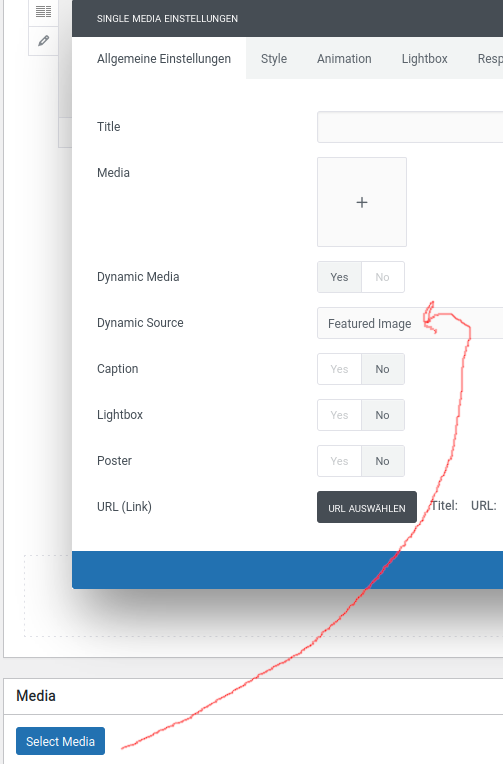
Hello. If we select the module Single Media. We can select only Featured Images under Dynamic Source. Would it be possible for you to make it so that we can also select the Media as Source?
Here is a image Link: https://i.postimg.cc/T2V1tH6n/Bildschirmfoto-vom-2024-12-12-09-35-48.png
Hi Node19! At the moment, this is not an option, and I can’t say if it can be done. I need to present this to the developers, and if possible, it will be included in a future update.
Thank you very much for the quick reply. Then I hope that the developers think it’s a good idea and implement it.
Hi Node19! By the way, you can try the Media Gallery, which can by design also be configured to look like a Single Media: https://lopezb.d.pr/i/uXc63d
Oh good to know. many thanks for this info
Hi Node19 and thank you for the confirmation! 
Hi mates.
One question, how can I show the page builder description below all the woocommerce products when I select a custom product content block in Theme Options->single->product->Content->Content type->Content Block?
The page builder description only is shown if I select Theme Options->single->product->Content->Content type->Default… but I need to create a custom product layout via content block…
Any ideas to solve this issue?
Thanks in advance.
Bests.
Hi Ray_Donovan! This is the default configuration of our demo. Obviusly, you need to have a Text Module with the Dynamic option: https://support.undsgn.com/hc/en-us/articles/360011205078-The-Product-Builder
We don’t know if, for some reason in your configuration, you are in an edge case but here we have a fix “Dynamic Text in Content Block”, that we’ll be published this Monday (if you believe the configuration is correct according to the documentation, you can check if this is the issue): https://support.undsgn.com/hc/en-us/articles/214092169-Patches-and-Fixes
Thank you very much. Problem solved!!!
Hi Ray_Donovan and thank you for the confirmation!
Hello, after updating “UNCODE CORE” the images on my website stopped appearing.
The “Uncode Child Plugins” after the “Uncode Theme” update.
And after restoring an old backup, the images appear blurry.
I have 5 websites, and this happens on two.
Error: https://mfoseguros.eu/ https://mfrealestate.eu/ Normal: https://mfoliving.eu/ https://mfoffice.eu/ https://mfhsaude.eu/Can you help?
Hello felipelessa!
The blurred images are due to Uncode version 2.7.9 not being compatible with the version of WordPress you are using. This issue was resolved starting from version 2.8.7.
As for why the images didn’t work before the downgrade, I can’t provide further assistance until I can see the problem directly.
If you prefer, feel free to reach out to our dedicated support team via our Help Center. Please submit a ticket here so we can review your installation and help you find a solution: https://support.undsgn.com/hc
Hello, thanks for the answer, I updated from version 2.7.9 to 2.9.1.3, on this website https://mfrealestate.eu/ to test again, and as I said previously, it is this update that causes the images to not be displayed.
My support license is currently expired, but if necessary, I will renew it. Although I will also need to purchase another Uncode license for another site, from this family of sites. Can you tell me the best solution?
Update: after reading some of the other previous comments, I decided to test deactivating the Polylang plugin, and that was the problem, the images were displayed again. Now the problem is having the menu in only one language.
Thank you for keeping us informed; it’s much appreciated. Best
Now the problem is having the menu in only one language.
Any suggestions for plugins, so that it is not necessary to install WooCommerce to use WPML?
Hi felipelessa! If you need to fix Polylnag (that we don’t support) you can follow this link: https://support.undsgn.com/hc/en-us/articles/214092169-Patches-and-Fixes
I don’t necessarily need to fix it. If there is a plugin or some other way to add the different menus to their respective languages, I am willing to change, especially because it seems that Polylang causes more problems than it solves.
Does the team recommend any solution for this specific case?
Hi felipelessa! You need to use one multilanguage plugin, Uncode is certified by WPML and Weglot: https://support.undsgn.com/hc/articles/214003905 – https://support.undsgn.com/hc/articles/360002070717
Thanks for all the help.
Thank you for the confirmation!