8663 comments found.

Hello,
My activation code is not working on my new domain.
I have already deregistered the license from the old domain, but I am still unable to activate it on the new one.
The activation code starts with 323759 (I have two codes).
Could you please help me reset or transfer the license?
Thank you.
Best regards,
Hi MateuszWiszniewski! We are not sure we fully understand your request. Do you need to create a new website with the same license and it’s not working? Anyway, next to the error message you probably have, there is a ‘More Info’ link that takes you to a documentation page with all the information you need. If you haven’t seen it in a nutshell, please send a private message using the form you find on this page and include your Purchase Code: https://themeforest.net/user/undsgn
Hi Uncode team. I have a little bug to report (not easy to describe sorry… check this on a desktop please – not phone or tablet) :
If, with a media gallery (with images), you activate the “load more” option (you load them 30 by 30 for exemple) and if you have one single block which has a different overlay color for exemple (lets assume it is the 8th and its overlay color is red instead of the black by default), THEN when you load the 30 next blocks, the 38th block will have a red overlay too, even if it is configured by default.
You can see the phenomenon on my webpage (https://www.illuminens.com/) : After the header and the introduction text, you’ll find the big gallery. the 8th block is a youtube video and has a red full overlay with a text overlay in the center of the block with a youtube icon. Then you go down to the “load more” button (“en voir +” in french). Clic on it. count 8 more blocks, you’ll find a picture of blue corridor in the center of the page. You can see that the overlay color is red like the 8th block at the beginning of the gallery. Again go down to the next load more button. count 8 more blocks : a picture of refectory with flying curtain -> red overlay.
NB : I tried many things : to customize them individually in the “single” tab, with a slight difference compared to the default settings so that it stops being red. Doesn’t work. next I tried to reset it back to default… doesn’t work. Each 8h first blocks has the same behavior of the first 8th block of the gallery.
I hope i’m clear, and you’ll be able to fix this in a next update. Thanks for your amazing work.
Hi Lebenzet! Please send a screenshot of how is configured your Single Block tab.
Thank you for your concern.
Hi Lebenzet! Ok we’ll check this Monday but at this point it’s probably better hack this element with a small CSS. What are the modifications needed by this element?
You’ll find all these informations in the screenshots. I’ve highlighted the modifications in the last screenshot (uncode-3-Single-details.jpg).
It is not a big deal for me. I can just remove the “load more” option. But I think you can re-create the bug. If it is the case, you’ve something to fix.
Hi Lebenzet! Ok, understood. I am passing this on to the developers, hoping it is something that can be fixed. If you need an immediate solution, please let me know the specific settings for this thumbnail and the specific thumbnail involved. We can then provide you with a simple CSS snippet to resolve the issue on your end.
Hello.
I have a problem. I have a license that I’ve used on my development domain. But when I try to publish, the license isn’t recognized.
Can You help me?
Hi fumauuu! Next to the error message you probably have, there is a ‘More Info’ link that takes you to a documentation page with all the information you need. If you haven’t seen it in a nutshell, please send a private message using the form you find on this page and include your Purchase Code: https://themeforest.net/user/undsgn
Hello. I wrote last week. Bui I have not answer
Hi fumauuu! We missed your message, please test it now!
hi, I can’t find the first row as header option anywhere. It is not in the dropdown :/
adding: I see the option on pages, but not on products. I use the page builder layout for product pages and really need to set the first row as header
Hi supermex! We do not recall this ever being an available option, primarily due to the way the Product architecture is structured. If you need a Header, you must use a Content Block Header. This is effectively the same tool, but it is managed externally (outside the individual page) to enable the creation of dynamic design matrices.
I know  But I would really need it for the products. Can you please guide me on a code snippet that enables it for products too That would be very helpful
Hi supermex! As previously mentioned, the only way to achieve this is by using the Content Block. If this were possible, it would have been included as a native option. 
Wireframes 1.10.0 is missing in the Uncode 2.11 download full package.
Hi onnodesign! Yes, we know that is missing. Right now, you can update it from the admin. It will be included in the next update in the next few days.
Thank you for your reply.
You welcome!
Hi there, We purchased your theme and now customizing that we not found a header template where we will customize that in header where social media is showing we need two buttons there please help us.
I’m also trying to submit the ticket but I only have theme purchase code as because my client not shared a enavto account access so please if you help me to customize the header template.
Hi wpsmarter1! We apologize for the inconvenience, but accessing our support system requires matching the License Code with the email address of the purchasing account. We enforce this security measure because there are many counterfeit copies of popular themes in circulation. Verifying this combination is the only way to ensure the license is valid. At this point, you have two options:
1 – Ask your client (the account owner) to open the ticket for you.
2 – Ask the client to request a refund (if they are still within the refund period) so that you—as the web designer—can purchase the license yourself and manage the support directly.
PS. From here, we can only suggest following this link (but please don’t ask for more support here): https://support.undsgn.com/hc/en-us/articles/18615150991133-Menu-Call-to-Action-Buttons
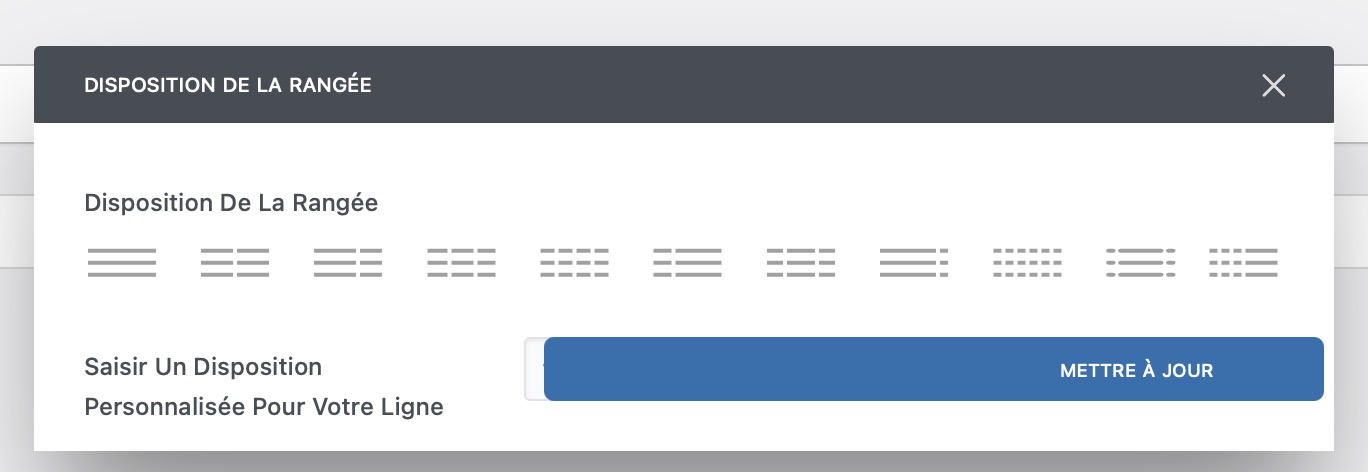
Hi undsgn team. Sorry to bother you again, but I’m having a very strange interface problem : I can’t customize my columns : The validation/update button covers the data field ! I have to switch to classic mode and edit the code. NB : I have the same problem on Safari, Chrome, and Firefox. Have you ever encountered this issue ?
You can have a look to see the problem by yourself here : https://www.illuminens.com/wp-content/uploads/Screenshot-undsgn.jpgHi Lebenzet! We are sorry, but we don’t have similar reports, and without a check, it’s not possible to understand the cause of the issue. Are the Uncode Core and WPBakery Page Builder plugins updated?
Hi ! I’m up to date : Uncode 2.11. The problem remains. I tried on 3 Mac. The first is running on MacOS Tahoe, the second, with Sequoia and the third on Mojave. Always the same thing, and with various browsers ! It’s strange that I’m the only one to experience this ! Again, this is not a big deal, I can deal with it switching to classic mode. Hope you’ll fix it in the near future future. Best regards.
Hi Lebenzet! Yes, we can confirm that no one else is reporting this issue. Otherwise, we would likely see hundreds of similar reports, given that this is one of the most basic features. This confirms that the problem is almost certainly related to a specific plugin you are using or a modification within your Child Theme, etc.
OK. I’ll investigate. Thkx.
You welcome!
We registered the theme purchase code on the demo site during development. After launching the live site, the theme update is not working on the live environment and is showing the following error: Update failed: There is an expected problem related to a possible website migration. Please remove the Purchase Code and register the product again from the System Status to validate the Purchase Code again. If the issue persists contact the theme author. (Error 23) Dismiss this notice.
So we removed the purchase code from the demo site and registered it on the live site. However, the registration is still not working and the following error is displayed: According to the Envato License Terms, you have exceeded the number of activations permitted for a single Purchase Code. Therefore, please purchase an additional license. If you think there is an error or you are migrating the website to a new domain, please follow the dedicated procedure. More info
We would like to register the code with the live domain, kinldly help us.
Hi pitsolutions! Next to the error message you probably have, there is a ‘More Info’ link that takes you to a documentation page with all the information you need. If you haven’t seen it in a nutshell, please send a private message using the form you find on this page and include your Purchase Code: https://themeforest.net/user/undsgn
Hi we have some problem with the saturation of the resource of hosting when we go to woocommerce product, we have update the e to latest version and all system requirements are ok? via hosting we set php resource well but in back end we see error on wp_memory_limit to 40 MB.
in my php.ini we don’t have 40 but 1GB
is possible this problem comes from it? how can we solve this?
Hi web623! We see that you have already opened a ticket in our Help Center. If you have submitted a private ticket, our support agents will respond to you directly there. Please note that all tickets are processed and answered in the order they are received.
ok thank’s
Hi web623! They should have already replied to you!
small question. Somehow on my mobile menu there are no dropdown arrows for the menu items, but on desktop they show. I can’t figure out why.
Hi supermex! Please share the link to your site, so we can check, we cannot understand the scenario without a preview.
Hi Undsgn team, I love your Uncode theme, which I’ve purchased a dozen times.
Before buying it for a new project, I’d like to know if you can help me with something very important: in the Query options of the Posts module, I’d like to be able to sort the Post types using a filter dynamically populated by a Custom Fields.
Specifically: On my website, I have custom post types for “Cities” and “Hotels”.
These custom post types are populated from databases in Notion, which are mapped to my WordPress site. In Notion I’ve sorted all my hotels into categories that correspond to cities.
For each city, I want to automatically assign the corresponding hotels. I don’t want to manually filter by going into the Posts module settings for each city; there are far too many cities.
What I want is to dynamically send data from Notion to a Custom Field on the “cities” Custom Post Types, and have that data automatically retrieved in the “Categories” filter of the Posts module query.
For example: I want to send the data “Boston” to a Custom Field on the Boston city page so that only hotels in the “Boston” category are displayed. Another example: I want to send the data “Chicago” to a Custom Field on the Chicago city page so that only hotels in the “Chicago” category are displayed.
Currently, I can easily send city names (or slugs) to my Custom Fields from Notion, but I can’t find a way to send this data to the “Categories” filter in the Posts Module query.
I’ve tried several Actions and Filter Hooks, but nothing works.
Could you tell me which Hook I should use? Or if there is another solution ?
Thank you for your reply and again for this great theme. Nicolas
Hi Undsgn team, a big thank for your response and the filter for Posts Module query. I just bought a new license for the futur website i’m working on.
I have a new request for you : Still within the context of populating my website with Notion, I’d like to be able to send a selection of photos to the Uncode Gallery block based on their IDs.
Ideally, I’d like to be able to select a Custom Field in the “Dynamic Source” parameter. This Custom Field would then be populated with the IDs of the photos I want to display in my gallery. However, this isn’t currently offered by the Uncode Gallery block.
So, I was wondering if there’s a filter (like the uncode_widget_posts_args filter for Posts Modules) that would allow populating the Uncode Gallery block with a custom field?
Thank you for your reply and again for this great theme. Nicolas
Hi nicocreazy! This is the filter we have:
$medias = apply_filters( ‘uncode_vc_gallery_medias’, $medias, $el_id );Anyway, if you need support is offered in our Help Center, there we have a completely dedicated support team, please submit a ticket: https://support.undsgn.com/hc
Hi, thank you very much, the filter works perfectly. And, yes, I also received a response on the support website, well done for your responsiveness!
Hi nicocreazy, and thank you for the confirmation!
Is the theme compatible with Tutor LMS Pro?
Hi mahershe! We checked our support records and found a couple of users asking for minor help with fine-tuning this plugin. However, those tickets date back a couple of years, so I cannot say for certain if any compatibility issues have emerged more recently. That said, if you do encounter any issues, this is something we can certainly support through our Help Center.
I submitted a ticket about how to create / edit page at this wordpress admin panel. I am not sure why my admin panel pages are broken and cannot be easy edited. In addition, the asset did not adopt elementor for page edit. I am looking for support from vendor on how to easily edit pages.
Hi rexcheung12345! Please note that every ticket is answered in the order it is received. There is no need to send separate notifications or alerts, as our system ensures every request is addressed sequentially. We have already sent a response regarding your issue. As shown in the attached screenshot, your site is experiencing 403 Server Errors on the majority of your files. This indicates that your server is blocking access to essential theme and plugin resources, which is likely the cause of the problems you are seeing.
Hi there, I bought this theme a few years ago for a project that is no longer active, now I want to use it on another project, how can I change the license to the new domain? please note I don’t want to use one license for two separate projects, I just want to change the domain.
Hi Artyconsdeveloper! We are not sure we fully understand your request. Do you need to create a new website with the same license, but it’s not working?
Anyway, next to the error message you probably have, there is a ‘More Info’ link that takes you to a documentation page with all the information you need. If you haven’t seen it in a nutshell, please send a private message using the form you find on this page and include your Purchase Code: https://themeforest.net/user/undsgn
Hi, Thank you for your reply.
I’m not sure which part of my original message was unclear.
I clearly stated that the original project is no longer active, the theme is not being used on two websites, and I only want to move the license to a new domain.
As requested, I’ve already sent a private message and included my purchase code. Could you please let me know how to deactivate or reset the license so I can activate it on the new domain?
Thanks.
Hi Artyconsdeveloper! We completely understand your message, but the fact that you are no longer using the theme on this site is not part of the ThemeForest Policy, which we invite you to check here: https://themeforest.net/licenses/standard
Regarding your private message, please rest assured that it will be answered. We process all messages in the order they are received, and you will receive a response as soon as an agent reaches your request in the queue.
Hi, I’ve reviewed the ThemeForest license page you shared. As stated there, a Regular License allows one end product per license.
I am not using the theme on multiple end products. The original project is discontinued, and I intend to use the license for a single new end product only.
Since domains are not defined or restricted by the ThemeForest license itself, this appears to be a technical activation matter rather than a licensing issue.
I understand my private message is in the queue and will wait for your reply.
Best regards.
Hi Artyconsdeveloper! We have sent you a detailed email explaining the Envato Policy and the fact that you have already used this license for two separate projects. Please note that the option to register a license twice is intended solely for creating a staging website for testing purposes. The policy explicitly states: “You are licensed to use the Item to create one single End Product for yourself or for one client (a ‘single application’).” As suggested in our previous message, if you have any further doubts, you can contact Envato support directly to confirm how their Terms of Service are applied.
So if i but the thmese the event creative demo will be included? please confirm + give me direct link to event creative so that I know what it contains exactly. Thank you and looking forward
Hi abed200328z! We are sorry, but we don’t quite understand your request… when you purchase Uncode, all the layouts you see in our demo are included (also the Creative Event). You don’t need to choose one specifically, as they are all available to you.
Hello,
I can’t seem to activate the Autoplay option on my YouTube and Vimeo videos. I have videos displayed in a media gallery with “Loop Poster.” When I click on the thumbnail that opens the video in Lightbox, it doesn’t start playing automatically.
I have looked at the instructions on the Support page https://support.undsgn.com/hc/en-us/articles/11568540310173-Autoplay-Videos. But I can’t find the solution.
For example, I can’t find the options mentioned in the article: Autoplay Videos: set the autoplay; Mute Videos: set the mute option.
Can you help me, please?
Thank you.
Hi arzuzu! We are sorry, but from here, we can’t provide much more information than what is already available in the documentation. To assist you further, we would need to access your site and check the entire setup. The only recommendation I can give at this stage is to double-check that you have enabled the autoplay parameter, as explained in our guide here: https://support.undsgn.com/hc/en-us/articles/214006105-Video-Options
Hello,
I’m unable to activate my Uncode license because the purchase code has exceeded the allowed number of activations.
The license was previously used on a development installation that has since been deleted without deregistering.
Could you please let me know how I can request an activation reset? I can provide the purchase code privately if needed.
Thank you.
Hi valsidalv! Next to the error message you probably have, there is a ‘More Info’ link that takes you to a documentation page with all the information you need. If you haven’t seen it in a nutshell, please send a private message using the form you find on this page and include your Purchase Code: https://themeforest.net/user/undsgn
Hi undsgn team ! I know, I’m going to post a feature request but I don’t find the page anymore in your documentation site. My request is very simple : it is a hover effect for the media gallery (an option that you perfectly know) :
I’d like to have the possibly to do what you’ve done on your uncode documentation website : the “knowledge Base”, “Video Tutorials”, “Change Log” and “Facebook Group” thumbnails rise slightly up and their shadow underneath intensify when the cursor passes over them. It is a very classic feature, but one that uncode lacks.
I’ve already post this request a long time ago and I hope to see it released at each update. But rest assured, even without it, I remain a big fan of Uncode, the GOAT theme ever. I hope my request will be heard and included in a future update. Thanks for you amazing work.
Hi undsgn team. Happy new year to you all ! I wonder if you received my request ? Thanks.
Hi Lebenzet!! We got a request from 30 December. Please note that completing this form does not guarantee that the implementation will be executed. If you need a short CSS please share the URL so we can create based on your settings.
Hi ! Of course, I know it’s just a request. I will very appreciate a custom short CSS. I sent you the URL of my website with my request. Did you get it ? Do I need to send you something else ? Thanks a lot.
Hi Lebenzet! if you need support, please share the link here. We cannot accept private messages (a part from the Help Center).
here’s the link : https://www.illuminens.com/
Hi Lebenzet! Ok but where we can find these boxes like the “Knowledge Base”, “Video Tutorials”, “Change Log” and “Facebook Group” thumbnails… do you need this effect on the project thumbnails?
Yes. I would like to have this effect on the project thumbnails for the main gallery on the home page (below the introduction text… the gallery with the filter…instead of the classic zoom hover effect… am I clear ?.
Hi Lebenzet! Try to insert this code in the Page Options > CSS:
.single-gutter > div > .tmb,
.single-gutter > .owl-carousel .tmb {
    transition-duration: .2s;
}

.single-gutter > div > .tmb:hover {
    transform: translateY(-18px);
}
Thanks a lot !
Thank you for the confirmation!
I’m taking advantage of this conversation to report a little issue (this is not a request or a need to support… I’m ok with it, but I would be happy if this is corrected in the future) : In this gallery (www.illumines.com) There are many images and an autoplay video (at the third ligne of the gallery). It works perfectly on desktop. But on mobile, the video doesn’t start by itself. At some point I had to click to one filter item and go back to ‘show all’ and then the video thumbnail starts. Now, I don’t know why it doesn’t start I precise that this is a youtube video using a Loop Poster Video ID. And Mobile Behavior is set to “Autoplay Video”. Maybe you already know the problem ?
Thanks again for your amazing work.
Hi Lebenzet! I don’t recall seeing similar reports, so I will pass this point on to the developers for further investigation.
Hi ! With your help I succed to recreate the effect entirely with the shadow effect. (you can get a look at https://www.illuminens.com). I add a white border to dissimulate a little glitch between the thumbnails and the shadows. The result is great. I want to thank you again for your help and your assistance. I think you should add this visual effect to gallery options. It is nice and simple. Best regards.
Hi Lebenzet! Looks nice!
Hi, pre-sales question. After a brief study, this asset included wooCommerce. However, we dont need it. I guess wooCommerce may make the system response slow down. We will only deploy it at a hosting web server which support wordpress. I wonder if we could remove it after deployment.
Hi rexcheung12345 and thank you for your interest!
If WooCommerce is not installed, all the assets and special functions dedicated to the shop’s operation are not loaded or activated. Uncode is designed to be lightweight, so it only triggers WooCommerce-specific code and styles when it detects the plugin is active. Without it, the theme treats your site as a standard installation, and any shop-related features or modules will remain unavailable.
How come when I try to import demo data, I get this error message.
Ooops, the Demo Content couldn’t be imported all in once Please refer to this troubleshoot thread for a possible workaround.
Hi jppv! Is your theme properly registered?
Anyway, if you need support is offered in our Help Center, there we have a completely dedicated support team, please submit a ticket so the Support Team can check your installation and support the solution: https://support.undsgn.com/hc